
Intro
If you grew up in Oklahoma like I did, you know the first sign of a tornado isn’t the siren. It’s the sky going deep grey blue, the air suddenly changing from muggy to dry and cool, and your dad walking onto your front porch with his hands on his hips looking up at the sky. The siren just tells you the time for preparing is over. The time for taking shelter has started.
A disaster recovery test is the same exercise on a different stage. You make sure you have a go bag, fresh batteries in the radio, and a few bottles of water stashed in the shelter. I wasn’t always that prepared. I can recall a time when the sirens went off and I was taking my pup down to the tornado shelter in my garage thinking, “if this actually hits, I’m royally underprepared.” It was the IT-ops version of Helen Hunt’s Jo Harding watching livestock fly past the windshield in Twister and going, “cow… another cow.” Funny in a movie. Less funny when the “cow” is your production cluster.
This post walks through an async DR test I ran on two Proxmox clusters backed by Pure FlashArray. Two FlashArrays paired with a one-hour async protection group, one Proxmox cluster on each side, and a Proxmox Backup Server (PBS) holding the cluster configuration so the destination side knows what to do with the bytes once they land.
The two cellars
| Source (primary) | Destination (DR) | |
|---|---|---|
| Proxmox cluster | pxmx01-01.fsa.lab | pxmx02-01.fsa.lab |
| FlashArray | x90r2-primary | x90r2-secondary |
| Protocol | iSCSI | iSCSI |
| Storage model | Shared LVM, all VMs on one LUN | Existing VG, no FA volumes presented yet |
| Source volume | MW-PXMX-iSCSI-Vol-01 | Receives via proxmox-1hr-rep pgroup |
| Config protection | proxmox-backup-client cron, hourly | PBS VM living on pxmx02 |
Two replication streams, two RPOs to keep in sync. The pgroup carries the disk data; PBS carries the cluster configuration. The next section explains why both are non-negotiable.
The bytes and the blueprints need to be in the same shelter
The pgroup on the FlashArray takes care of the bytes, every block that backs vm-107-disk-0, vm-108-disk-0, and the rest is on the destination array within the RPO window. What it doesn’t take care of is the blueprint. The .conf file that tells Proxmox “VM 107 is named ubuntu-dr-test-02, has 4 GB of RAM, boots from scsi0, and scsi0 lives at pure-storage-san:vm-107-disk-0“ lives in /etc/pve/qemu-server/107.conf and /etc/pve is pmxcfs, which is a node-local sqlite database synced inside the cluster. It never lands on the shared LUN. Lose the source cluster, lose the file, and the destination side is staring at a perfectly-replicated disk image with no idea what kind of VM was supposed to wrap around it.
That tight pairing between the .conf and the LV name is the whole game during recovery. The disk entry in 107.conf reads scsi0: <storage-id>:vm-107-disk-0, and Proxmox finds the disk by looking up the storage ID in storage.cfg, then asking that VG for an LV named vm-107-disk-0. If the VG isn’t activated, or the storage ID in the config doesn’t exist in storage.cfg, or the LV name doesn’t match, the VM won’t start. So the configs have to travel with the same RPO as the data, and they have to land somewhere the DR side can read them. Usually that means at the DR site itself, but it could be anywhere outside the fault domain of the primary site.
There are a handful of ways to solve this: a cron rsync of /etc/pve/qemu-server/ to the DR node, a vzdump config-only backup written to the replicated NFS share, even a git repo with a commit hook. I went with PBS to stay in the Proxmox ecosystem, but any of the previously mentioned options would work just as well.
I’ll skip the PBS install in this post (the Proxmox Backup Server install docs cover it and there’s no point in duplicating them). The relevant parts for this story are the user, the cron, and how to get the VM metadata in and out of PBS.
The user and token. A dedicated PBS user, pxmx01-backup@pbs, with an API token (cron-token) scoped to DatastoreBackup on the pve-configs datastore. The cron job uses the token, not root, so the credential in the file on disk can only write backups (it can’t delete the datastore or read someone else’s snapshots).
The credentials file on each pxmx01 node, /etc/pbs-backup/env, chmod 600:
PBS_REPOSITORY="pxmx01-backup@pbs!cron-token=<token-secret>@<pbs-vm-ip>:pve-configs"
PBS_FINGERPRINT="<sha256-fingerprint-of-pbs-cert>"
The wrapper script, /usr/local/bin/pbs-config-backup.sh, that the cron actually invokes:
#!/bin/bash
set -a
source /etc/pbs-backup/env
set +a

proxmox-backup-client backup \
  qemu-configs.pxar:/etc/pve/qemu-server \
  lxc-configs.pxar:/etc/pve/lxc \
  cluster-db.pxar:/var/lib/pve-cluster \
  --repository "$PBS_REPOSITORY" \
  --fingerprint "$PBS_FINGERPRINT" \
  >> /var/log/pbs-config-backup.log 2>&1
Three pxar archives in one snapshot: VM configs, container configs, and the raw pmxcfs database. The last one is the safety net: if the qemu-server archive is somehow incomplete, I can still rebuild from cluster-db.pxar (and that’s exactly what I end up doing in the recovery section below).
The cron entry itself, /etc/cron.d/pbs-config-backup, runs at five past every hour:
5 * * * * root /usr/local/bin/pbs-config-backup.sh
That’s it for steady state. One small file, one wrapper, one cron line, and the configs ride to the DR site every hour with the same kind of RPO as the disk data.
Watching the wall cloud form (pre-flight)
Before declaring the storm has hit, four quick confirmations on the source side.
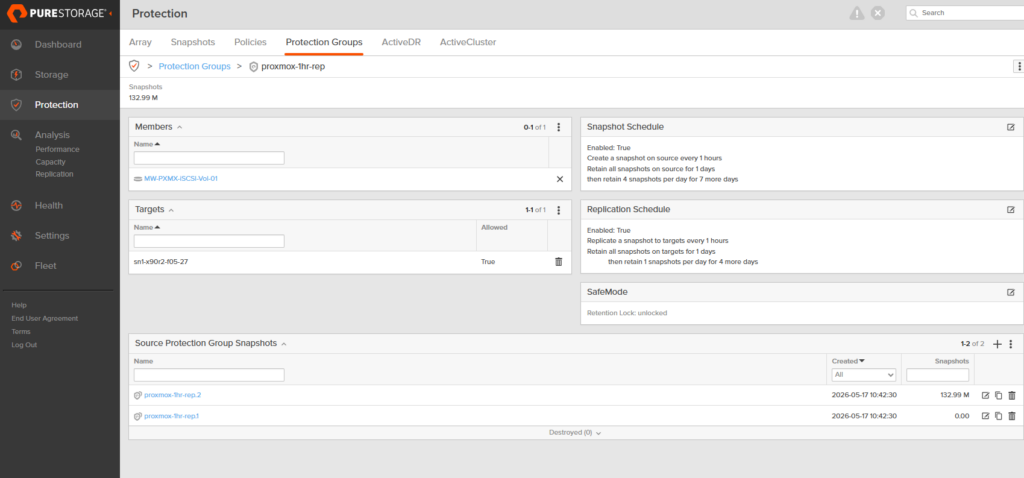
Protection group has a fresh snapshot:
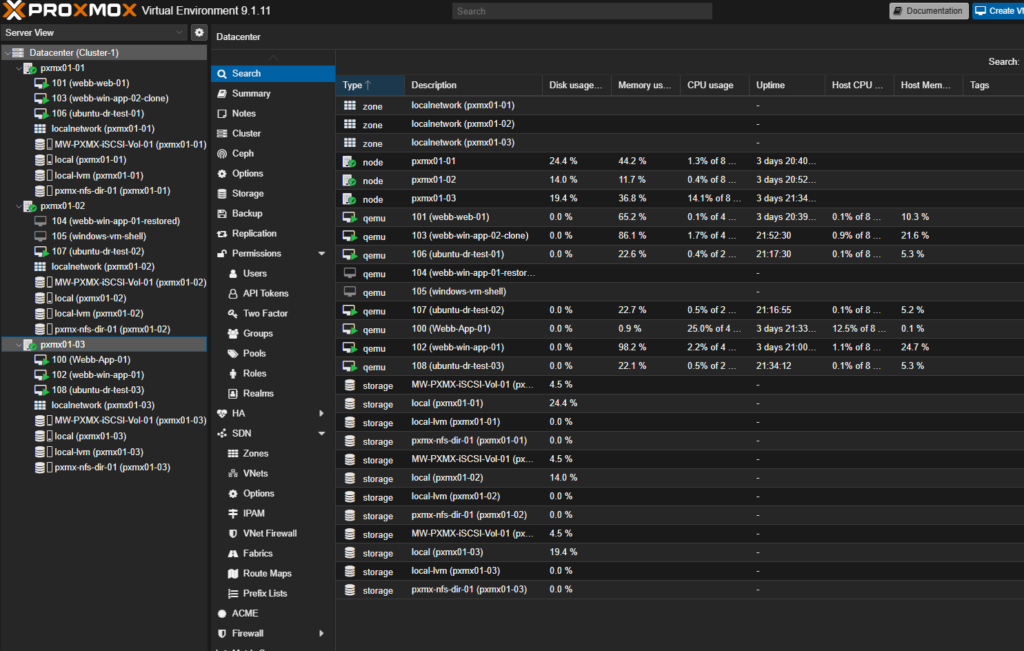
Source cluster is healthy and the VMs are where I expect them:
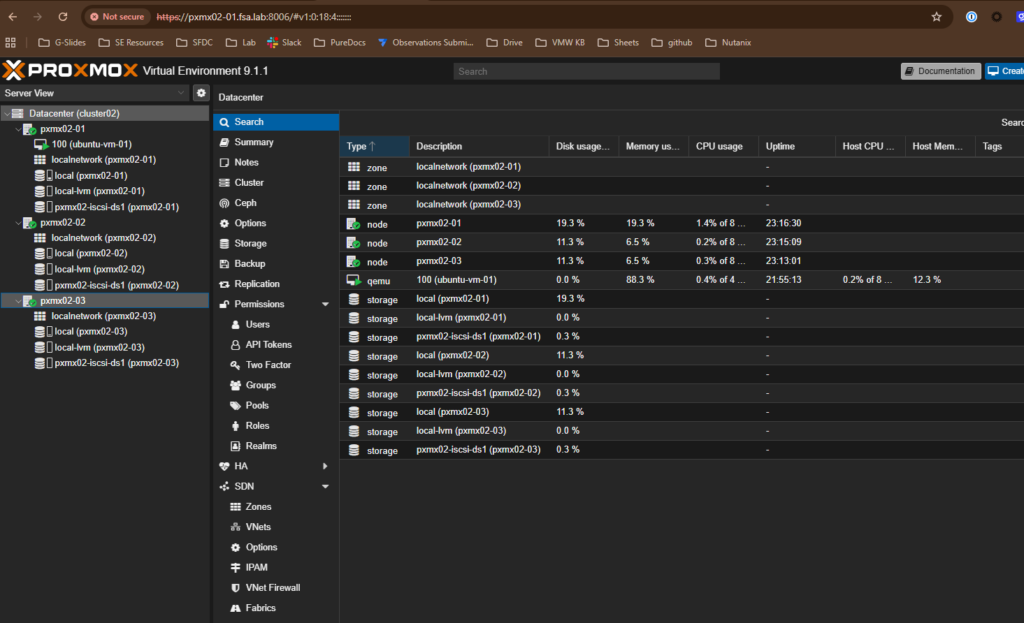
Destination cluster is up but unaware that anything is about to land:
Verification data inside one of the test VMs (vm 106) so I have something to recognize on the other side:

The hourly cron will give me a config snapshot at most 60 minutes old, but I want this test as tight as it can be. So I trigger the same script manually on pxmx01-01 one more time right before declaring source dark:
/usr/local/bin/pbs-config-backup.sh
The output of the underlying proxmox-backup-client call shows the deduplication doing its job, only cluster-db.pxar actually moved bytes; the other two archives matched the previous hourly:
qemu-configs.pxar: had to backup 0 B of 1.831 KiB
lxc-configs.pxar:  had to backup 0 B of 96 B
cluster-db.pxar:   had to backup 4.024 MiB of 4.024 MiB
Duration: 0.07s
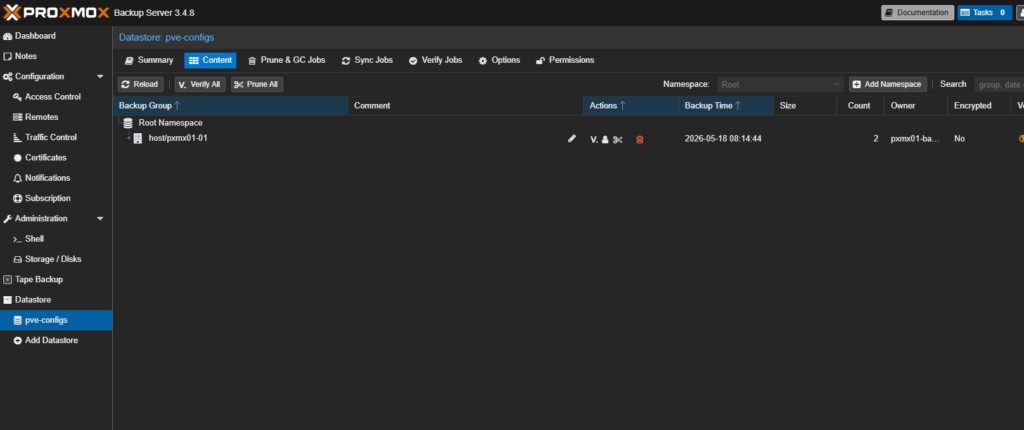
From the destination side, the new snapshot is already visible through the same PBS, which is the proof the configs made it out before the (simulated) primary went dark:
root@pxmx02-01:~# proxmox-backup-client list --repository "$PBS_REPOSITORY"
host/pxmx01-01  host/pxmx01-01/2026-05-18T15:14:44Z  2  catalog.pcat1 cluster-db.pxar index.json lxc-config…
The replicated snapshots are visible on the destination FlashArray too:
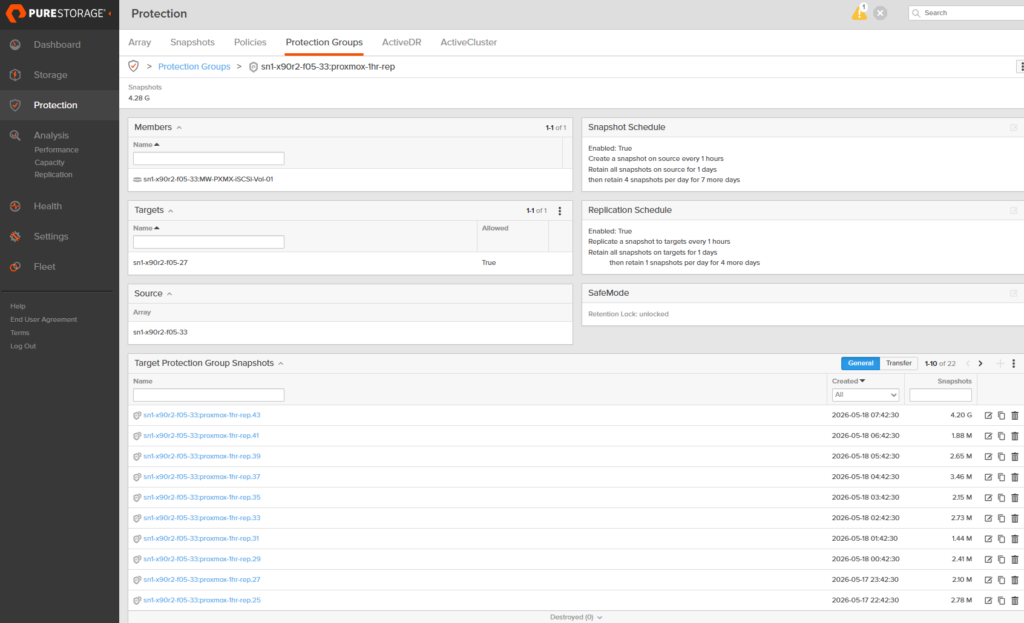
Past this point I treat the source as gone. Everything that follows is on pxmx02 and x90r2-Secondary.
After the storm: recovering at the DR site
1. Clone the replica snapshot to a writable volume
On the destination FlashArray, copy the most recent transferred snapshot of MW-PXMX-iSCSI-Vol-01 to a new writable volume. Replication keeps running underneath, the clone is independent.
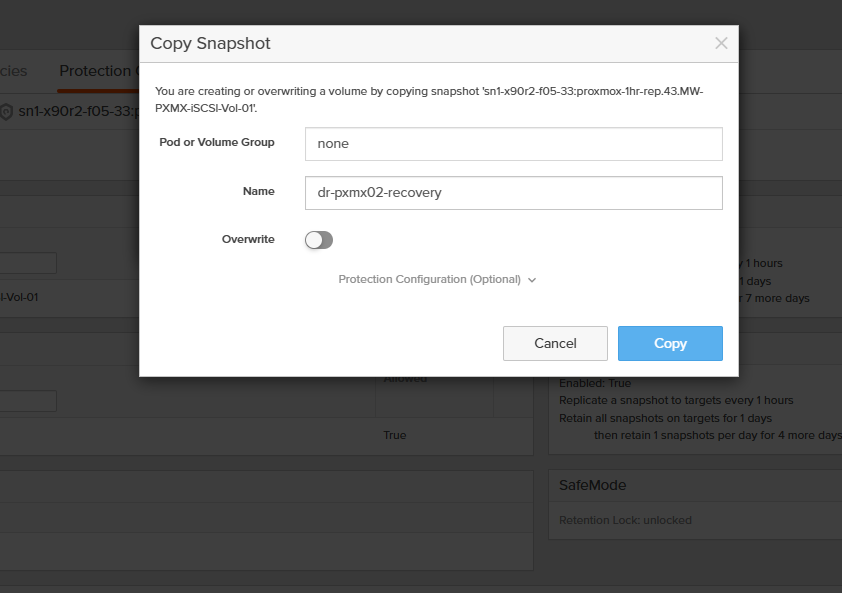
2. Connect the cloned volume to the pxmx02 host group
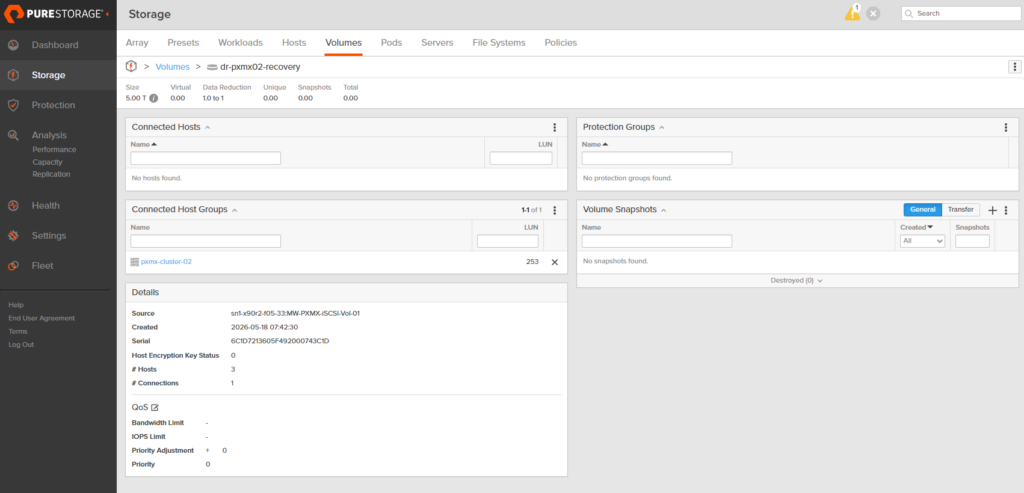
3. Rescan iSCSI on the destination Proxmox node
root@pxmx02-01:~# iscsiadm -m session --rescan
Rescanning session [sid: 1, target: iqn.2010-06.com.purestorage:flasharray.6fb3576b8af88fd5, portal: 10.21.245.11,3260]
Rescanning session [sid: 2, target: iqn.2010-06.com.purestorage:flasharray.6fb3576b8af88fd5, portal: 10.21.245.12,3260]
Rescanning session [sid: 3, target: iqn.2010-06.com.purestorage:flasharray.6fb3576b8af88fd5, portal: 10.21.245.10,3260]
Rescanning session [sid: 4, target: iqn.2010-06.com.purestorage:flasharray.6fb3576b8af88fd5, portal: 10.21.245.13,3260]
lsblk confirms the new 10 T multipath device (3624a93706c1d7213605f492000743a3b) has shown up under all four paths, and multipath -ll shows multipathing is working.
4. Spot the volume group (and stop before activating it)
vgscan finds the foreign VG carried over from the source cluster:
root@pxmx02-01:~# vgscan
  Found volume group "pve" using metadata type lvm2
  Found volume group "pure-storage-vg" using metadata type lvm2
  Found volume group "f05-27" using metadata type lvm2
pure-storage-vg is the one that rode in on the replicated LUN. The temptation here is to immediately vgchange -ay and watch the LVs light up, but don’t. The recovered VG carries LVM metadata from the source cluster, and if you activate it before the destination cluster knows about it as a storage pool, the pve daemons get confused trying to reconcile those identifiers against their own. The symptom is pveproxy going quiet on 8006 while SSH stays fine. Add the storage definition first (next step), and let pvedaemon handle activation once the pool is registered.
5. Add the recovered VG to storage.cfg
Tell Proxmox the VG exists before activating it, so when the LVs do come online the cluster already has a storage ID to attach them to. I appended the new pool to /etc/pve/storage.cfg:
lvm: pure-storage-san
        vgname pure-storage-vg
        content images,rootdir
        nodes pxmx02-01,pxmx02-02,pxmx02-03
        shared 1
6. Pull the VM configs out of PBS
The PBS snapshot from Section 4 contains cluster-db.pxar, which is the on-disk form of /var/lib/pve-cluster. Restore that into a scratch directory:
mkdir -p /tmp/pve-restore
proxmox-backup-client restore host/pxmx01-01/2026-05-18T15:14:44Z \
  cluster-db.pxar /tmp/pve-restore/ --repository "$PBS_REPOSITORY"
The cluster DB is a sqlite file, so the individual .conf files need to be extracted out of it. One small loop pulls every numbered .conf row back out as a flat file:
mkdir -p /tmp/extracted_vms
for conf_file in $(sqlite3 /tmp/pve-restore/config.db \
    "SELECT name FROM tree WHERE name GLOB '[0-9]*.conf';"); do
    sqlite3 /tmp/pve-restore/config.db \
      "SELECT data FROM tree WHERE name='$conf_file';" > /tmp/extracted_vms/$conf_file
done
Result is the full set of VM configs from the source cluster sitting in a tmp directory, ready to be filtered and placed:
root@pxmx02-01:~# ls /tmp/extracted_vms/
100.conf  101.conf  102.conf  103.conf  104.conf  105.conf  106.conf  107.conf  108.conf
7. Rewrite the storage pool name in every config
The source cluster called the LVM pool MW-PXMX-iSCSI-Vol-01. The destination cluster doesn’t have a pool with that name, it has pure-storage-san from step 5. One sed rewrites every disk reference in place:
sed -i 's/MW-PXMX-iSCSI-Vol-01/pure-storage-san/g' /tmp/extracted_vms/*.conf
A spot check on a recovered config confirms the disk now points at the destination pool:
root@pxmx02-01:~# cat /tmp/extracted_vms/103.conf | grep -E "scsi|sata|virtio|ide"
boot: order=ide0;net0
ide0: pure-storage-san:vm-103-disk-1,size=80G
scsihw: virtio-scsi-single
8. Place only the VMs you actually want to recover
The recovered VG carries every disk image from the source cluster, but the DR test only cares about a subset. Drop just those .conf files into the destination node’s qemu-server directory and pmxcfs propagates them cluster-wide:
root@pxmx02-01:~# cp -v /tmp/extracted_vms/{103,107,108}.conf \
    /etc/pve/nodes/pxmx02-01/qemu-server/
'/tmp/extracted_vms/103.conf' -> '/etc/pve/nodes/pxmx02-01/qemu-server/103.conf'
'/tmp/extracted_vms/107.conf' -> '/etc/pve/nodes/pxmx02-01/qemu-server/107.conf'
'/tmp/extracted_vms/108.conf' -> '/etc/pve/nodes/pxmx02-01/qemu-server/108.conf'
9. Boot
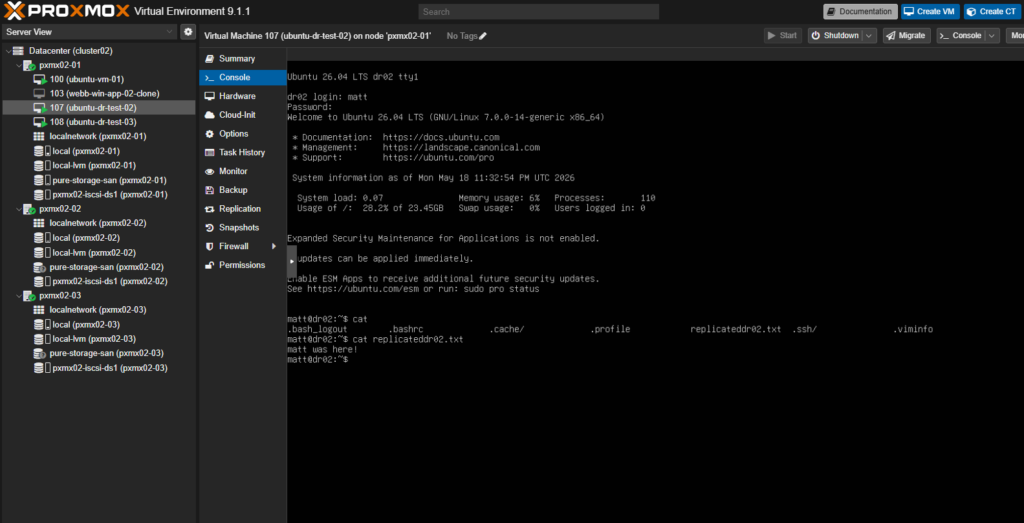
107 and 108 came up clean (I screwed up and recovered 103 which had a windows TPM module missing its TPM chip and would not boot. I meant to do 106, but 107 and 108 were the same with the same txt file as seen in the pre-flight section ). The recovered config and the activated LV line up exactly the way Proxmox expects:
root@pxmx02-01:~# cat /etc/pve/nodes/pxmx02-01/qemu-server/107.conf
boot: order=scsi0;ide2;net0
cores: 2
memory: 4096
name: ubuntu-dr-test-02
net0: virtio=BC:24:11:DD:C2:F9,bridge=vmbr0,firewall=1
scsi0: pure-storage-san:vm-107-disk-0,iothread=1,size=50G
scsihw: virtio-scsi-single

root@pxmx02-01:~# lvs | grep vm-107
  vm-107-disk-0 pure-storage-vg -wi-ao----  50.00g
Open the VM console, log in as the same user from the pre-flight step, and the verification file written before the (simulated) storm hit is right where I left it. That’s the recovery point, confirmed end-to-end.
Closing
This is a technical example of using FlashArray’s async replication via protection groups. A similar objective could be done with ActiveDR. Next, I’ll be exploring how you can leverage active cluster which will have some nuances to stretching your Proxmox cluster. Do you have some feedback for me regarding Proxmox and FlashArray? Please reach out to me on Linkedin!