
Intro
If you’re old enough, you remember the ritual: the game starts glitching, so you pop the cartridge out, blow into it, and slide it back in. Don’t let anyone tell you that it didn’t work… You KNOW it did. But the cool part is the console never moved, the controller was still in your hand, you just changed what was loaded in the slot. That’s exactly what a dev database refresh should feel like: leave the server right where it is (same hostname, same connection strings, same everything the app team hard-coded three years ago) and just swap the data in the slot for a fresh copy of production.
A lot of DBA’s are huge fans of FlashArray because they could quickly refresh massive databases in seconds. With shops moving to new platforms like OpenShift, many are asking how they can accomplish what they were previously doing on vSphere. Let’s jump in the lab and find out!
The Problem in One Sentence
A dev SQL box needs to be refreshed with production data on demand (in place, keeping its own identity) without copying terabytes across the network.
This is a different ask than the one I covered in Cloning SQL Server on OpenShift. That post spun up brand-new, disposable clones in brand-new namespaces in pods. This one is about Kubevirt VMs in a existing, long-lived dev system (the one with a DNS record, monitoring, and a dozen app configs pointing at it) that just needs its data volume swapped out for a fresh copy of prod. The dev VM stays. Its OS stays. Its name stays. Only the data changes.
The Stack
Quick map of what’s doing what in the lab:
- OpenShift Virtualization (KubeVirt) runs the VMs. Our “prod database” and “dev database” are each a VM with a dedicated data disk. VM’s running Centos.
- Portworx Operator is the storage orchestrator, fronting the array with the
pxd.portworx.comCSI driver. - Pure FlashArray is the block storage underneath. Snapshots and copies here are metadata operations (there’s no data movement), which is the entire reason this is fast.
- FADA (FlashArray Direct Access) is the specific volume type. Also known as px-csi volumes.
Here’s the whole play on a whiteboard:
              OpenShift Virtualization (KubeVirt)

   ┌──────────────────────────┐        ┌──────────────────────────┐
   │  VM: prod-db-01  (PROD)   │        │  VM: dev-db-01  (DEV)     │
   │  disk /dev/vdb            │        │  disk /dev/vdb            │
   │  mount /var/lib/appdata   │        │  mount /var/lib/appdata   │
   └─────────────┬────────────┘        └─────────────┬────────────┘
                 │  PVC: prod-db-01-data             │  PVC: dev-db-01-data
                 │  (FADA: 1 PVC = 1 array volume)   │  (same disk, remounted)
                 v                                   v
  ══════════════════════════  Pure FlashArray  ══════════════════════════
   pod: flasharray-vmpod

        ┌─────────────────┐                 ┌─────────────────┐
        │   prod volume   │                 │   dev volume    │
        │  serial ...092F │                 │  serial ...0932 │
        └────────┬────────┘                 └────────▲────────┘
                 │                                   │
                 │ (1) snapshot                      │
                 v                                   │
        ┌─────────────────┐                          │
        │    snapshot     │                          │
        │ (point-in-time) │ ──── (2) overwrite ──────┘
        └─────────────────┘

  dev volume is refilled in place: serial ...0932 never changes
 ═════════════════════════════════════════════════════════════════════════
The trick the whole post hangs on: step 2 refills the dev volume in place, so its serial (...0932) never changes. The dev VM just unmounts and remounts the same disk and finds prod’s data on it.
Lab Setup: Prod and Dev
We have a namespace, fada-refresh-demo, with two VMs. Each has a 30 GB root disk and a dedicated 3 GB FADA data disk (serial DBDATA01) where the “database” lives. The size is small in this example, but the speed will be the same regardless of scale. To keep the whole thing CLI-driven, my “database” is a data directory with a version marker, a customers table exported as CSV, and a sha256 manifest (a stand-in for the real .mdf/.ldf files, but easy to checksum and prove).
Here’s prod’s data disk:
# on prod-db-01
cat /var/lib/appdata/DB_MARKER.txt
cat /var/lib/appdata/customers.csv
PROD database - version 1 - seeded Thu Jul 16 02:12:29 AM UTC 2026
id,name,note
1,ACME Corp,PROD row 1
2,Globex,PROD row 2
3,Initech,PROD row 3
And here’s dev, which is running some stale copy from a refresh nobody remembers doing:
# on dev-db-01, before the refresh
cat /var/lib/appdata/DB_MARKER.txt
cat /var/lib/appdata/customers.csv
DEV database - STALE - last refreshed 3 months ago
id,name,note
1,OldCustomer,DEV stale row
Let’s see how we can refresh the data leveraging FA Snapshots.
Finding the Volumes on the Array
Because FADA is one-PVC-to-one-volume, we can walk from the Kubernetes object straight to the array. Get the PV name behind each data PVC:
for pvc in prod-db-01-data dev-db-01-data; do
  echo "$pvc -> $(oc get pvc $pvc -n fada-refresh-demo -o jsonpath='{.spec.volumeName}')"
done
prod-db-01-data -> pvc-1a2b3c4d-1111-2222-3333-444455556666
dev-db-01-data  -> pvc-7f8e9d0c-aaaa-bbbb-cccc-ddddeeeeffff
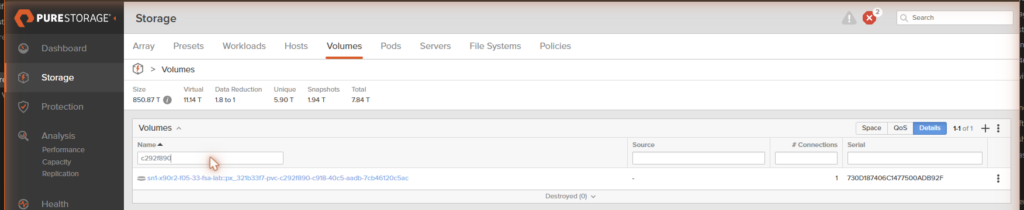
On the FlashArray, Portworx names those volumes <pod>::px_<clusterid>-<pv-name>. So our two volumes are:
- prod:
flasharray-vmpod::px_9f8e7d6c-pvc-1a2b3c4d-... - dev:
flasharray-vmpod::px_9f8e7d6c-pvc-7f8e9d0c-...
Let’s grab their serials up , because the serial is how we’re going to prove the identity trick at the end:
[prod data] serial=5F1A2B3C4D5E6F70A0DE092F
[dev data ] serial=5F1A2B3C4D5E6F70A0DE0932
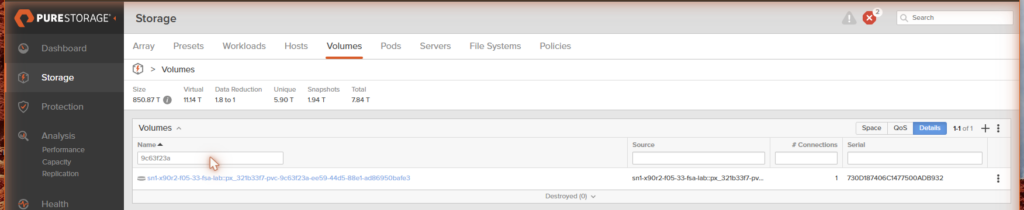
Remember ...932 it will come up later
Talking to the FlashArray
I’ll use REST calls since I have that easily available from the API key for FA to make the px-csi config work.
If you haven’t logged in via REST before…
SESSION=$(curl -sk -X POST -H "api-token: $APITOKEN" \
  https://192.0.2.10/api/2.25/login -D - -o /dev/null \
  | awk -F': ' '/x-auth-token/{print $2}' | tr -d '\r')
From here it’s two REST calls. (If you’d rather SSH to the array and use the purevol CLI, I’ve noted the equivalents, and they map one to one.)
Step 1: Quiesce and Snapshot Prod
A snapshot is only as good as the state of the filesystem when you take it. SQL Server on Windows would get a CHECKPOINT and a VSS-quiesced snapshot; on my Linux data disk the equivalent is a sync plus a filesystem freeze, so the snapshot is clean rather than merely crash-consistent. Freeze it, snapshot it, thaw it, and keep the freeze window as short as possible:
# freeze the prod data filesystem (inside prod-db-01)
sudo sync && sudo fsfreeze -f /var/lib/appdata

# snapshot the prod volume on the array, with a friendly suffix
curl -sk -X POST -H "x-auth-token: $SESSION" \
  "https://192.0.2.10/api/2.25/volume-snapshots?source_names=<PROD_VOL>&suffix=devrefresh"

# thaw immediately
sudo fsfreeze -u /var/lib/appdata
The snapshot comes back instantly:
{
  "name": "flasharray-vmpod::px_9f8e7d6c-pvc-1a2b3c4d-...devrefresh",
  "serial": "5F1A2B3C4D5E6F70A0DE0934",
  "provisioned": 3221225472,
  "source": { "name": "...pvc-1a2b3c4d-..." }
}
purevolequivalent:purevol snap --suffix devrefresh <PROD_VOL>
We can also see the Snapshot in the Purity UI
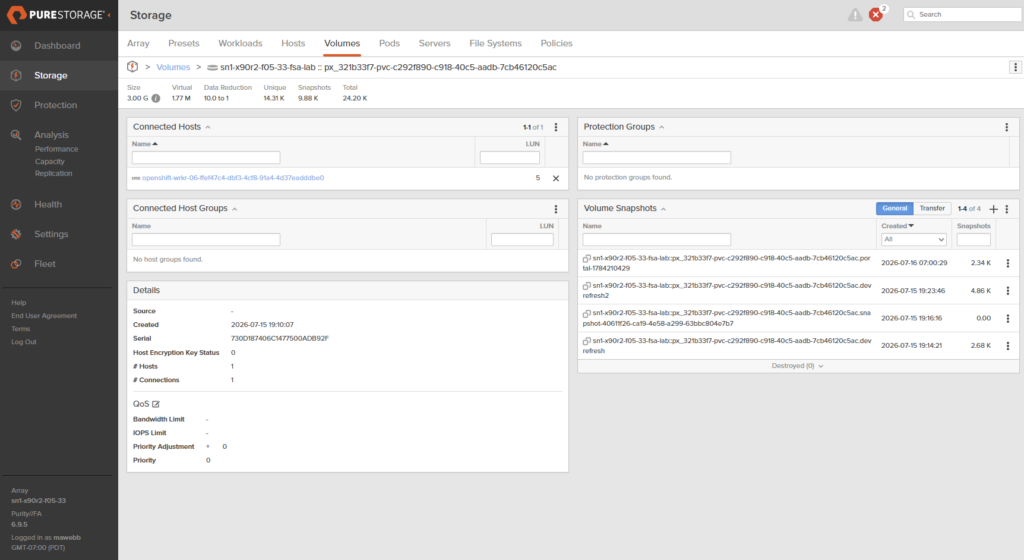
We now have a frozen, immutable, point-in-time copy of prod’s data disk, and it cost us essentially nothing and about half a second of a freeze window.
Step 2: Quiesce Dev
Here’s the one meaningful difference from spinning up a new clone: because we’re overwriting a volume that’s mounted and in use, we have to quiesce it first. The important part is that this is a disk operation, not a VM operation: we don’t reboot dev, we just take its data disk offline for a moment. On my Linux VM that’s a plain unmount, and the VM keeps running the whole time:
# inside dev-db-01 (the VM stays up, no reboot)
sudo umount /var/lib/appdata
For SQL Server on Windows it’s the same move one level up: stop the SQL Server service (or take the database offline) and offline the disk with Set-Disk -IsOffline $true. No server reboot, which is exactly how the classic VMware-RDM refresh scripts have always done it.
Step 3: Overwrite
Now we copy the snapshot onto the existing dev volume, in place. This is the array operation that has no clean equivalent in vanilla Kubernetes, you’re not making a new PVC, you’re refilling the one dev already has:
curl -sk -X POST -H "x-auth-token: $SESSION" -H "Content-Type: application/json" \
  "https://192.0.2.10/api/2.25/volumes?names=<DEV_VOL>&overwrite=true" \
  -d '{"source":{"name":"<PROD_SNAPSHOT>"}}'
{
  "name": "flasharray-vmpod::px_9f8e7d6c-pvc-7f8e9d0c-...",
  "serial": "5F1A2B3C4D5E6F70A0DE0932",
  "source": { "name": "...pvc-1a2b3c4d-..." },
  "provisioned": 3221225472
}
purevolequivalent:purevol copy --overwrite <PROD_SNAPSHOT> <DEV_VOL>
Look at that serial: 5F1A2B3C4D5E6F70A0DE0932. Exactly the value we memorized before we started. The dev volume’s contents were completely replaced with prod’s, but the volume itself is the same volume (same name, same serial, same host mappings). Portworx and OpenShift have no idea anything happened underneath them; from their side, dev-db-01-data is the same PVC it always was.
Step 4: Remount
The VM never went anywhere, so there’s no boot to wait on. Flush the block device’s cached buffers, remount the data disk, and see which reality it’s living in:
# inside dev-db-01 (still running)
sudo blockdev --flushbufs /dev/vdb
sudo mount /dev/vdb /var/lib/appdata
cat /var/lib/appdata/DB_MARKER.txt
cat /var/lib/appdata/customers.csv
sha256sum -c /var/lib/appdata/MANIFEST.sha256
PROD database - version 1 - seeded Thu Jul 16 02:12:29 AM UTC 2026
id,name,note
1,ACME Corp,PROD row 1
2,Globex,PROD row 2
3,Initech,PROD row 3
/var/lib/appdata/DB_MARKER.txt: OK
/var/lib/appdata/customers.csv: OK
The stale OldCustomer row is gone; ACME, Globex, and Initech are present; and the checksums match prod’s manifest byte for byte. The refresh is done, and not one block of data crossed the network to make it happen.
The Other Way: The Kubernetes-Native Clone
Of course moving to a new platform has new capabilities. So let’s take a peek at what you could accomplish with k8s tools.
If you don’t need to preserve dev’s identity (if a new volume is fine) you can stay entirely inside Kubernetes and never touch the array’s API. Snapshot the prod PVC with a VolumeSnapshot, then provision a new PVC from it:
apiVersion: snapshot.storage.k8s.io/v1
kind: VolumeSnapshot
metadata:
  name: prod-db-01-data-snap
  namespace: fada-refresh-demo
spec:
  volumeSnapshotClassName: px-csi-snapclass
  source:
    persistentVolumeClaimName: prod-db-01-data
---
apiVersion: v1
kind: PersistentVolumeClaim
metadata:
  name: dev-db-clone-data
  namespace: fada-refresh-demo
spec:
  accessModes: [ReadWriteMany]
  volumeMode: Block
  storageClassName: flasharray-vmpod
  resources: { requests: { storage: 3Gi } }
  dataSource:
    apiGroup: snapshot.storage.k8s.io
    kind: VolumeSnapshot
    name: prod-db-01-data-snap
The snapshot is READYTOUSE=true almost instantly, and the clone PVC binds to a fresh volume carrying the same prod data. Hotplug it into the dev VM and it’s got ACME/Globex/Initech too:
virtctl addvolume dev-db-01 --volume-name=dev-db-clone-data --serial=CLONE01 -n fada-refresh-demo
But here’s the difference that matters. Check the new volume’s serial on the array:
[k8s-native clone] serial=5F1A2B3C4D5E6F70A0DE0938 <-- a NEW serial
...938, not ...932. The native path gave us a brand-new volume with a brand-new identity. That’s perfect when you’re standing up disposable environments (exactly the pattern from the last post), and it’s beautifully declarative and GitOps-friendly. But it does not refresh an existing volume in place; you’d get a new PVC that your dev VM would have to be re-pointed at. Same data, different volume.
Two Patterns, One Decision
Here’s the cheat sheet:
| Array overwrite | Kubernetes-native clone | |
|---|---|---|
| Result | Existing dev volume refreshed in place | New PVC/volume from the snapshot |
| Volume identity | Preserved (same serial, mappings) | New volume, new serial |
| Dev VM identity | Unchanged; keeps its data disk | Must be pointed at the new volume |
| Requires dev downtime | Brief data-disk offline (no VM reboot) | No |
| Driven by | FlashArray API / purevol | oc apply (pure Kubernetes) |
| Best for | Refreshing a long-lived dev/test/staging box | Disposable, on-demand environments |
If the app team hard-coded a connection string to a specific server and you need that server to have fresh data by 8 AM, you want the array overwrite. If you’re handing developers throwaway copies, you want the native clone. Same snapshot underneath; different last mile.
Doing This with Windows SQL Server
My lab ran Linux VMs because it let me keep every step scripted and checksummed. The customer driving this is running Windows SQL Server, so let me be clear about what changes and what doesn’t:
- The array workflow is identical. Snapshot the prod data volume, offline the dev data disk, overwrite it, bring it back online. The FlashArray does not care what filesystem or OS is on top of the blocks. The serial-preservation trick works exactly the same.
- The guest steps change. Instead of
fsfreeze, you quiesce SQL Server properly with aCHECKPOINTand, ideally, a VSS-coordinated snapshot so the.mdf/.ldfare application-consistent. On the dev side you stop the SQL Server service and offline the disk withSet-Disk -IsOffline(no server reboot); when you bring the disk back online, SQL recovers the database. - The data disk must be FADA. As noted up top, that’s doubly true for Windows: FADA is required both for the array snapshot/overwrite workflow and for SCSI-3 reservations if the dev or prod instances are Windows Failover Clusters / Always On shared-disk designs.
The muscle memory a Windows DBA already has from the VMware-RDM-plus-Pure-snapshot world ports over almost verbatim. The array calls are the same calls; only the wrapper around them (KubeVirt instead of vSphere) is new.
Why not Portworx Cloud Drive?
Portworx Enterprise via Cloud Drives gives you fantastic capabilities for portability, backup, DR and give you flexibility of hardware (HCI or any SAN.) I intend on showing how we could accomplish this with Portworx Cloud Drive in a future post. However, one big thing related to databases, at this time PX-E with cloud drives doesn’t support SCSI-3 PR for Windows Failover Cluster Instances that use a shared disk. Making PX-CSI/FADA the go to use case for those workloads.
Outro
See something amiss? Reach out to me on Linkedin!
Now blow the dust off and press start.