
Sync rep: Proxmox HA with Everpure ActiveCluster
This is a continuation of replication features for FlashArray with a Proxmox environment. I’m running out of witty analogies, so I’ll just start with a joke:
What’s a tornado’s favorite game?
Twister!
ActiveCluster is Everpure’s synchronous replication technology. Meaning that every data written is sent to the other site before fully acknowledged. Bringing your RPO down to 0. For enterprise shops that have tight SLA’s, this usually is used in a stretched metro datacenter. Think similar to a availability zone in a hyperscaler, but built on-prem with automated failover of those virtual machines.
This post is about the compute side. With storage sorted, can Proxmox VE survive the complete loss of a three-node site (hard power-off, no graceful shutdown) and restart workloads on the surviving site automatically? The answer is yes, but the mechanism that makes it work is worth understanding: QDevice quorum.
The Lab
Six Proxmox nodes split evenly across two simulated sites, each site backed by a Pure Storage X90R3.
| Site | Nodes | Array |
|---|---|---|
| Site A | pxmx01-01, pxmx01-02, pxmx01-03 | X90R3 Site A |
| Site B | pxmx02-01, pxmx02-02, pxmx02-03 | X90R3 Site B |
The Proxmox cluster runs Purity//FA 6.9.3 and Proxmox VE 9.1. iSCSI is the storage transport: Site A nodes connect to X90R3 Site A portals, Site B nodes connect to X90R3 Site B portals. ALUA handles path preference: each site’s hosts use their local array as the Active/Optimized path while the stretched volume remains accessible from either array at all times.
The quorum problem. A six-node cluster has a total vote count of 6. Quorum requires a majority (4 votes). If Site A disappears, Site B has only 3 votes, which is below quorum. Without quorum, Proxmox refuses to take any action: it won’t fence, it won’t restart VMs, it just waits. That’s correct behavior (it’s avoiding a split-brain scenario) but it means Site B alone can never self-heal.
This is different then how vSphere accomplishes this, which does not use a witness device. Instead the hosts have two paths to determine if other nodes are “dead.” One by the management network and then the storage heartbeats given by their shared datastores. If you are doing vSAN that setup is different and does require a witness.
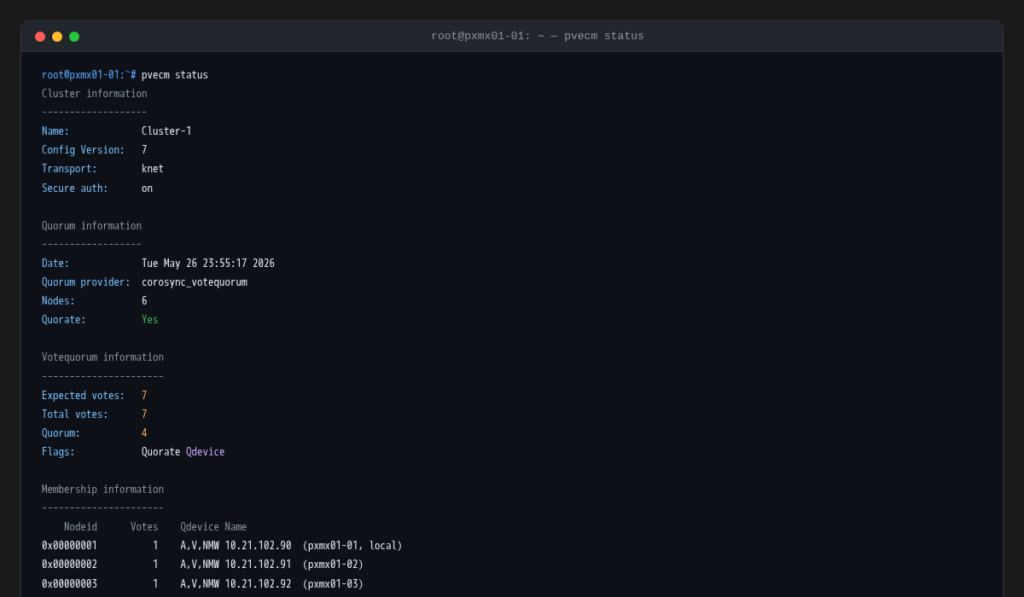
The fix for Proxmox is a QDevice: a lightweight quorum daemon running on a third host (not a Proxmox node) at a neutral network location. The QDevice contributes 1 additional vote. Total votes become 7, quorum is 4. Site B (3 votes) plus QDevice (1 vote) equals exactly 4, enough to declare quorum and proceed.
Setting Up the QDevice
The QDevice (corosync-qdevice) is a lightweight quorum daemon running on a third host outside either site, and it’s the piece that makes the whole stretched cluster design actually work in a failure scenario. It doesn’t run VMs, doesn’t store data, just needs to stay reachable from both sites so it can cast a tiebreaker vote when one site goes dark.
Setup is two commands: install the daemon on a neutral host, then register it from any Proxmox cluster node.
# On the QDevice host (10.21.101.117)
apt install corosync-qdevice

# On any Proxmox node
pvecm qdevice setup 10.21.101.117
Latency requirements: Based on my resarch, corosync is fairly tolerant of latency on the QDevice link (the default token timeout is 1000ms) but in practice you want sub-10ms round-trip to keep quorum transitions clean and avoid false-positive split-brain detection. The Everpure ActiveCluster synchronous replication has its own ceiling: ≤ 10ms RTT between the two arrays is the hard requirement for the storage layer, so if your inter-site link meets that bar your Corosync ring links will be fine too. The QDevice host should sit on a third failure domain (a cloud VM, an out-of-band management network, anything that won’t disappear with either site) because a QDevice that goes down with Site A is no help to Site B.
Step 1: Creating the Stretched Pod and Volume
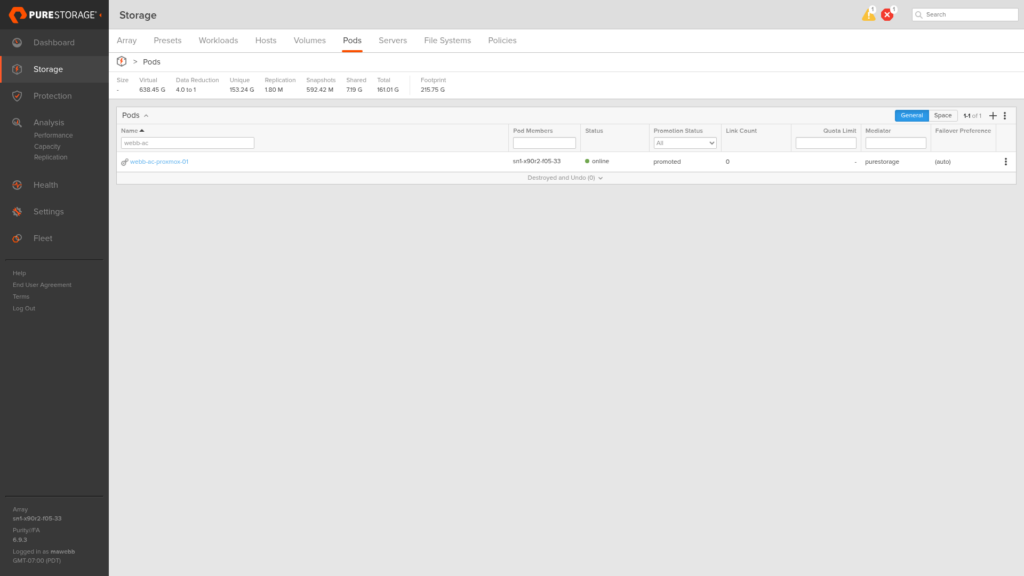
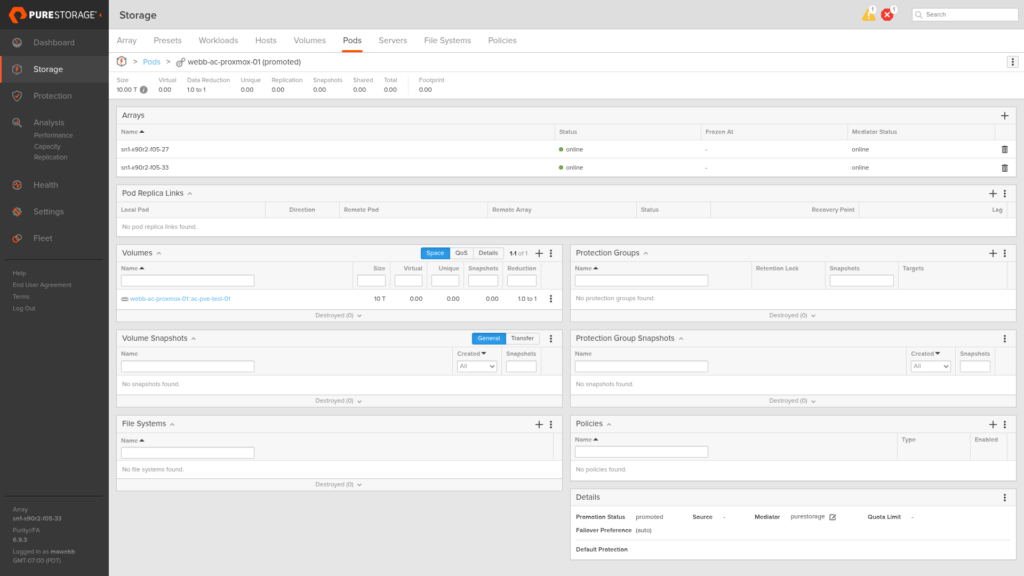
Everything starts on X90R3 Site A. A pod named webb-ac-proxmox-01 is the ActiveCluster container: volumes inside it will be synchronously replicated to whichever arrays are added to the pod.
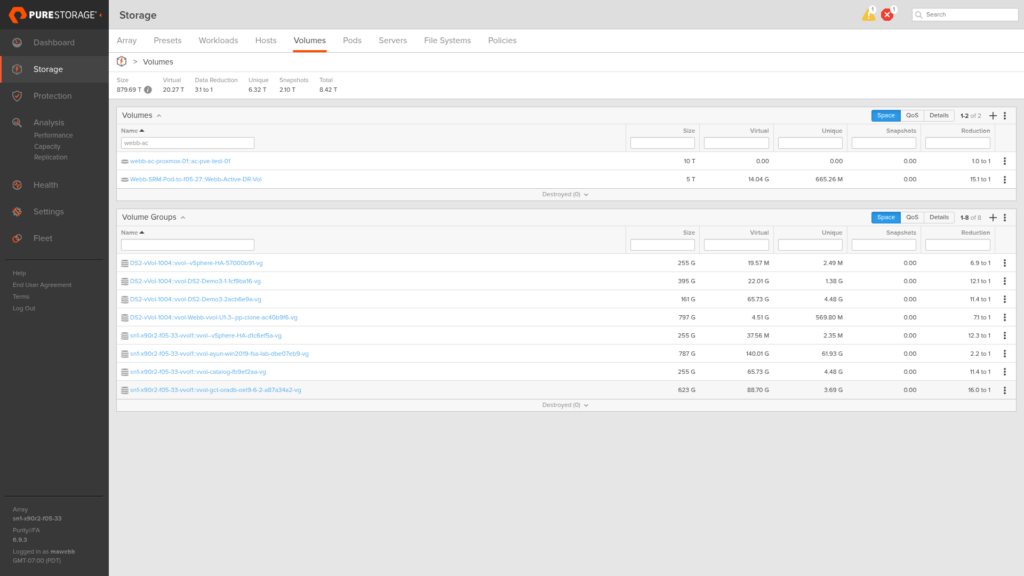
Inside the pod, a 10 TiB volume named ac-pve-test-01 will serve as the shared block device for Proxmox storage.
Step 2: Stretching to Site B
Adding X90R3 Site B to the pod’s arrays field kicks off synchronous replication. The moment X90R3 Site B is added, Purity establishes the ActiveCluster relationship and begins syncing any existing data. For a new, empty pod the sync completes almost instantly (here you can see X90R3 Site B momentarily offline while the handshake completes).
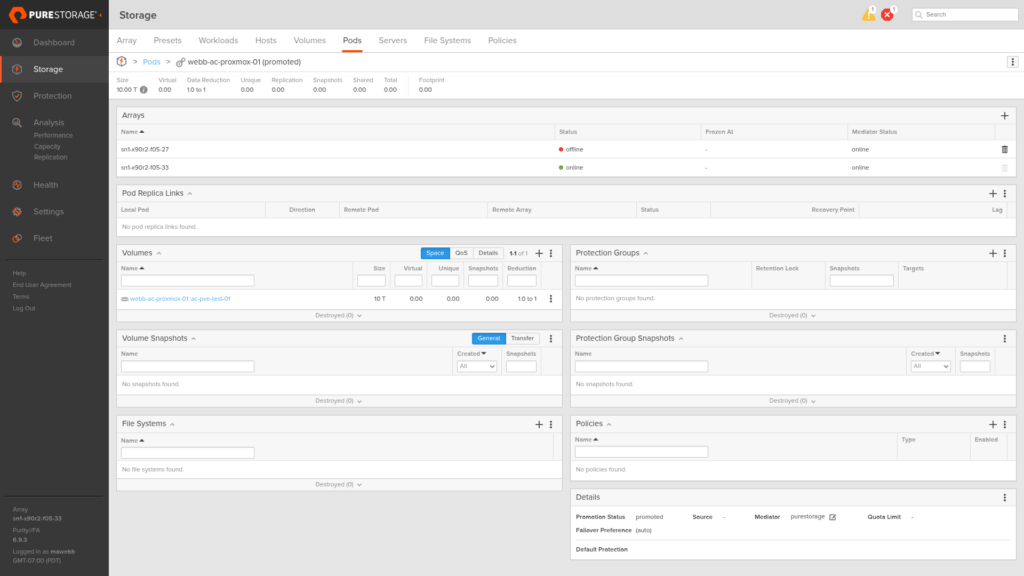
Seconds later, both arrays are online and the pod is fully stretched. From this point forward, every write to the volume is committed to both arrays before the host receives an acknowledgement. We now have ActiveCluster being…. ACTIVATED.
Step 3: Host Access and ALUA, Site A (X90R3 Site A)
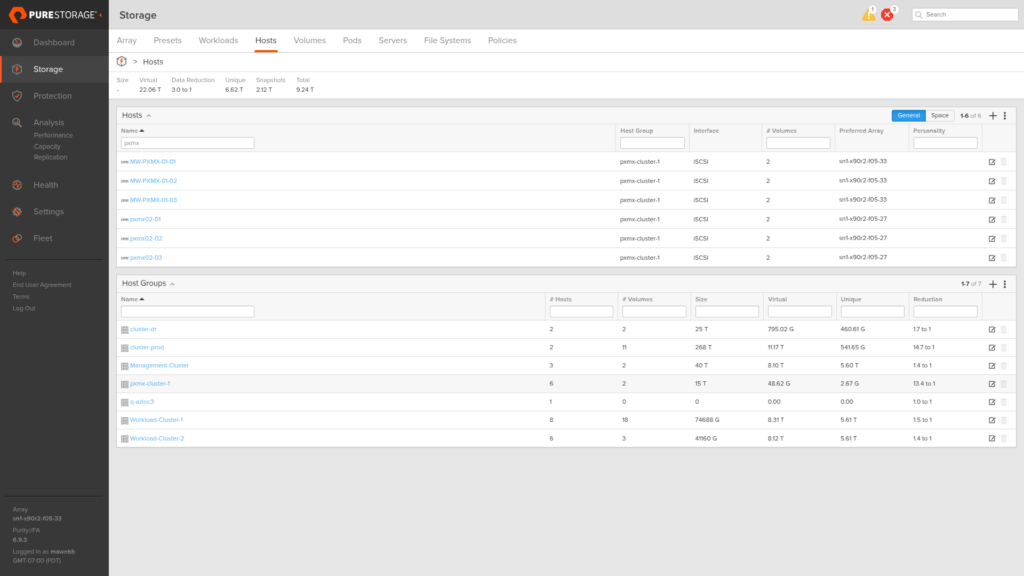
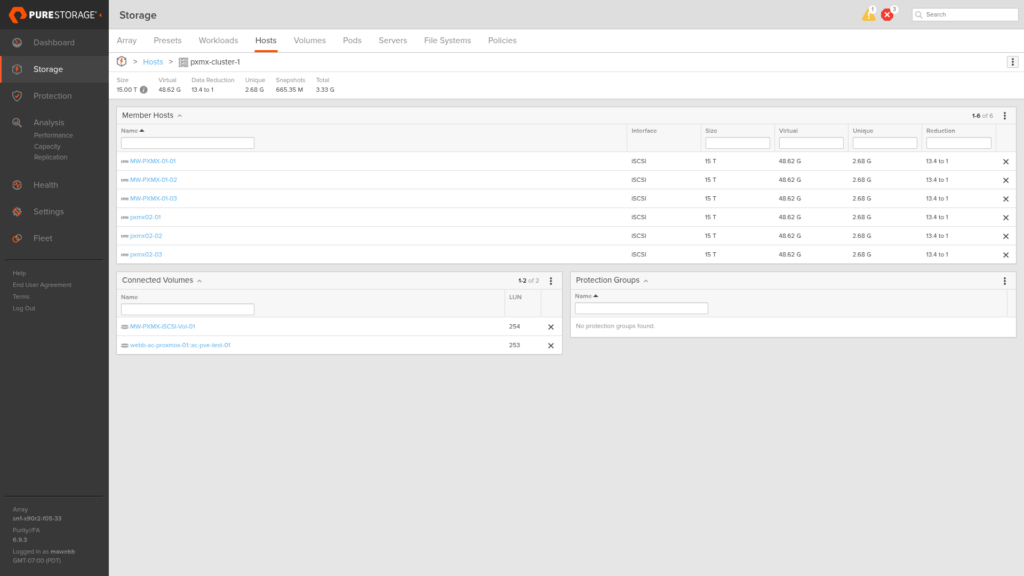
The host group pxmx-cluster-1 on X90R3 Site A contains all six Proxmox nodes across both sites. Connecting the stretched volume to this host group presents it to every node in the cluster at once, and the Preferred Array setting on each host object tells X90R3 Site A how to advertise ALUA path states: Active/Optimized (prio=50) to Site A hosts, Active/Non-Optimized (prio=10) to Site B hosts.
The host group detail shows all six member hosts and the connected volumes, including webb-ac-proxmox-01::ac-pve-test-01 at LUN 253.
The Preferred Array field on each host object is what drives the ALUA advertisement (here it’s set to X90R3 Site A on a Site A node, telling the array to advertise Active/Optimized paths to that host).
Step 4: Host Access and ALUA, Site B (X90R3 Site B)
The same on X90R3 Site B: host group pxmx-cluster-02 contains all six nodes, the pod volume is connected, and Preferred Array is set to X90R3 Site B on the Site B host objects (and X90R3 Site A on the Site A host objects). This gives every host a local Active/Optimized path through its nearest array and a standby Active/Non-Optimized path through the remote one.
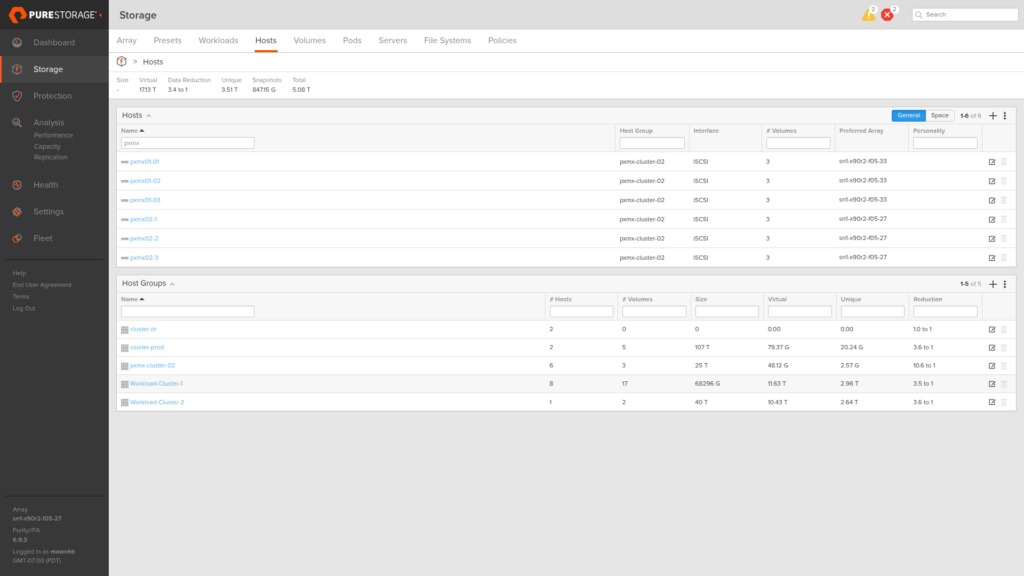
The host group detail on X90R3 Site B mirrors Site A: all six nodes present, webb-ac-proxmox-01::ac-pve-test-01 connected at LUN 252.
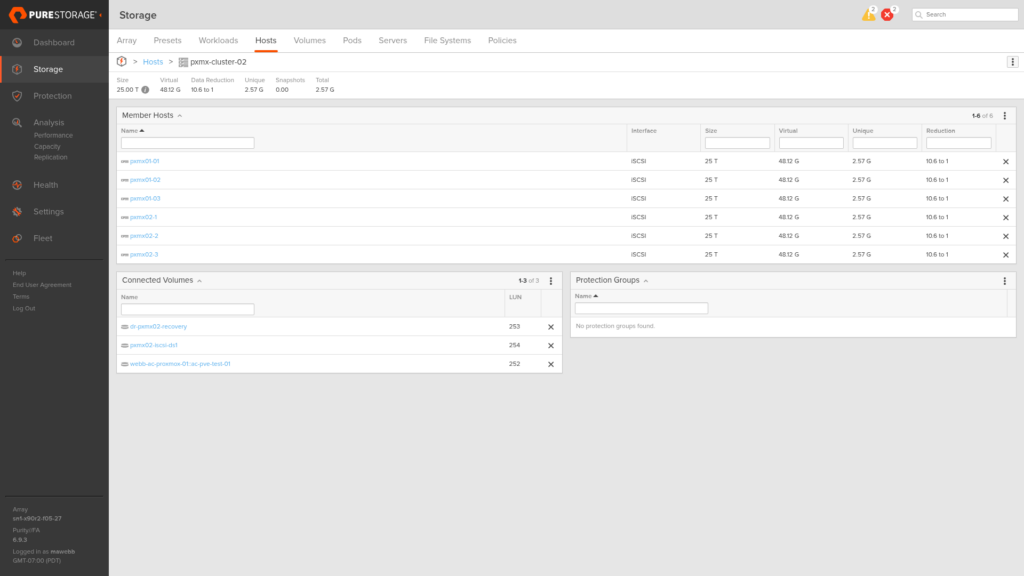
The result in multipath on any node: two path groups. The prio=50 group carries all steady-state I/O through the local array, the prio=10 group sits in standby through the remote array ready to take over if the local array fails (no host reconfiguration required, multipath promotes the paths automatically).
Step 5: Shared Storage in Proxmox
With the volume connected to all six hosts through both arrays, the next step is making it a Proxmox shared storage pool. The volume appears in multipath as a single 10 TiB device with WWID 3624a9370730d187406c1477500a7aa92.
# Confirm the device (LUN 253 from X90R3 Site A perspective)
multipath 3624a9370730d187406c1477500a7aa92

# Create LVM VG
pvcreate /dev/mapper/3624a9370730d187406c1477500a7aa92
vgcreate pxmx-ac-vg /dev/mapper/3624a9370730d187406c1477500a7aa92

# Register as shared LVM storage across the cluster
pvesm add lvm pxmx-ac-shared --vgname pxmx-ac-vg --shared 1
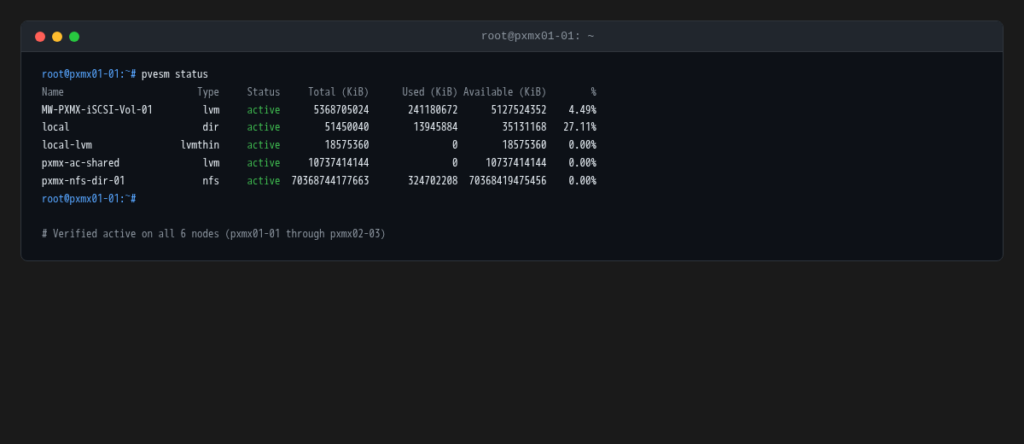
The --shared 1 flag tells Proxmox this storage is cluster-wide (all nodes can create and manage volumes on it). Note LVM thick is neccessary: each VM disk gets a dedicated logical volume with fixed allocation, no thin pool overhead, and allows for a shared iSCSI LUN.
After running pvscan --cache and vgchange -ay pxmx-ac-vg on each node to activate the VG through their respective multipath devices, all six nodes report the storage as active.
Step 6: Test VMs
Two minimal VMs are cloned from an existing base image into pxmx-ac-shared, placed on Site A nodes with no network interfaces and reduced to 1 vCPU / 1 GB RAM (just enough to boot and serve as HA test subjects).
ac-test-vm-01(VMID 300) on pxmx01-01ac-test-vm-02(VMID 301) on pxmx01-02
qm clone 101 300 --name ac-test-vm-01 --full --storage pxmx-ac-shared --target pxmx01-01
qm clone 101 301 --name ac-test-vm-02 --full --storage pxmx-ac-shared --target pxmx01-02
qm set 300 --delete net0 --cores 1 --memory 1024
qm set 301 --delete net0 --cores 1 --memory 1024
qm start 300 && qm start 301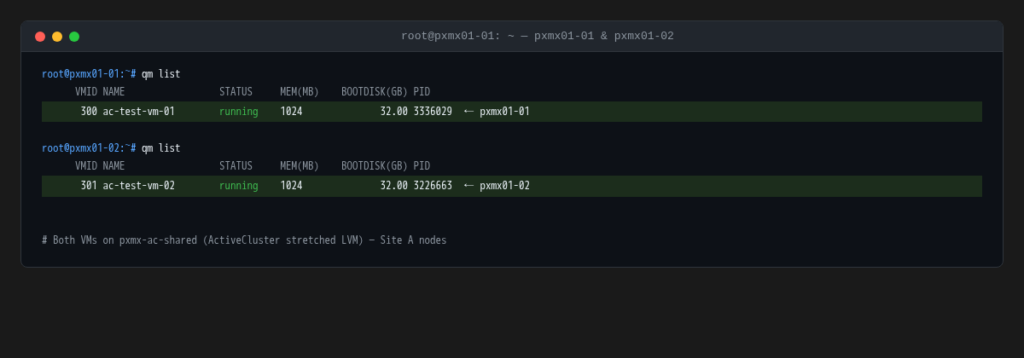
Step 7: HA Configuration
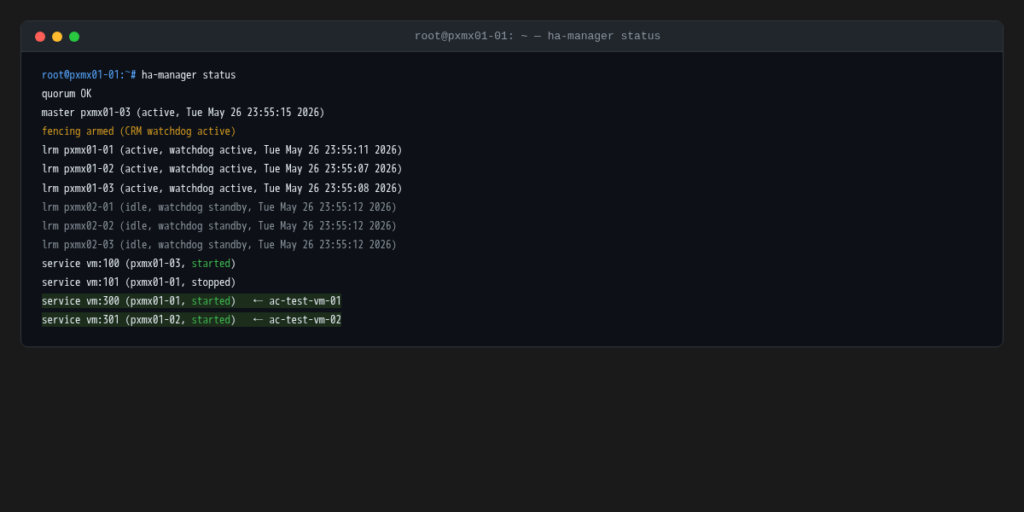
Both VMs are registered with Proxmox HA, which arms the watchdog fencing and tells the cluster manager to maintain these VMs in the started state regardless of which nodes are available.
pvesh create /cluster/ha/resources --sid vm:300 --state started
pvesh create /cluster/ha/resources --sid vm:301 --state started
The preflight ha-manager status shows both VMs started on Site A nodes, fencing armed, and all six LRMs healthy. Site B nodes sit idle with watchdog in standby (exactly where you want them before the test).
The Test: Hard Power-Off Site A
Now we smother Site A Proxmox hosts with a pillow. No graceful shutdown, the equivalent of holding the power button till all the lights go off. From the cluster’s perspective, three nodes simply stop responding at once.
A watch on a Site B node captures the sequence in real time.
T+10s: Quorum survives
Within seconds of the power-off, Corosync detects the three missing nodes. The vote count drops to 4: three Site B nodes plus the QDevice. That’s exactly the quorum threshold. The cluster declares itself quorate and elects a new master on Site B.

Without the QDevice this would be the end of the story. Three votes does not reach quorum, the cluster goes into a wait state, and VMs never restart. The QDevice is not optional in a stretched two-site design.
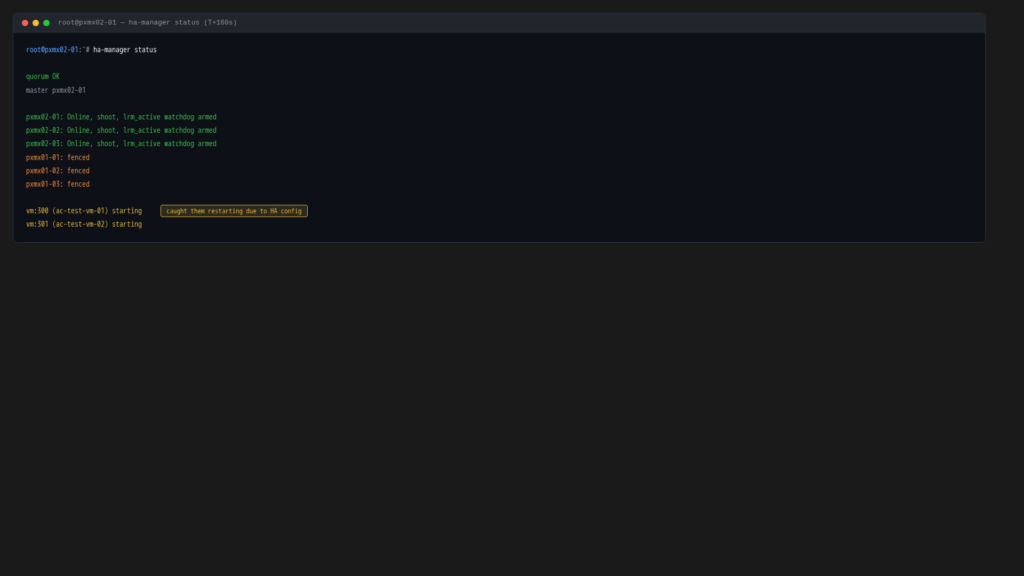
T+160s: Fencing complete, restart triggered
The HA manager can’t restart VMs on dead nodes (it has to be certain those nodes are truly dead, not just partitioned and still running). The mechanism is the softdog watchdog: if an LRM loses contact with the CRM for long enough, the watchdog fires and the node self-fences by rebooting. The CRM waits for that timer to expire before treating the node as safely fenced.
At around T+160s the fence timeout elapses. The HA manager marks the Site A nodes as fenced and immediately queues the VMs for restart on Site B.
T+170s: VMs running on Site B
Ten seconds later both VMs are started. No storage failover was involved (pxmx-ac-shared was already active on the Site B multipath devices through X90R3 Site B before the failure ever happened). The Proxmox LVM just activated the logical volumes on the VMs’ disks and started the guests.
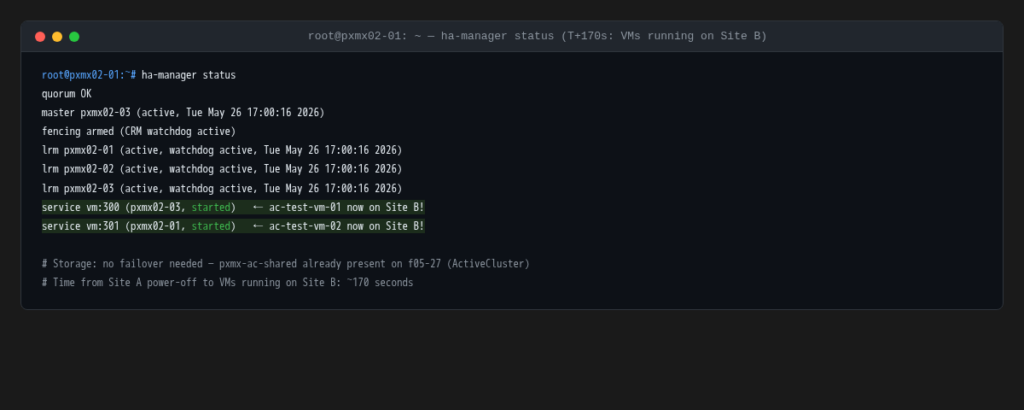
Total time from hard power-off to VMs running on Site B: ~170 seconds. The fencing timer dominates that number (the actual VM restart took about 10 seconds). Tuning the watchdog timeout is how you control this tradeoff between safety (longer timeout = more certainty before fencing) and recovery speed (shorter timeout = faster restart).
Recovery
Site A nodes are powered back on. Within about 20 seconds all three rejoin the cluster, the vote count returns to 7, and the full membership is restored.
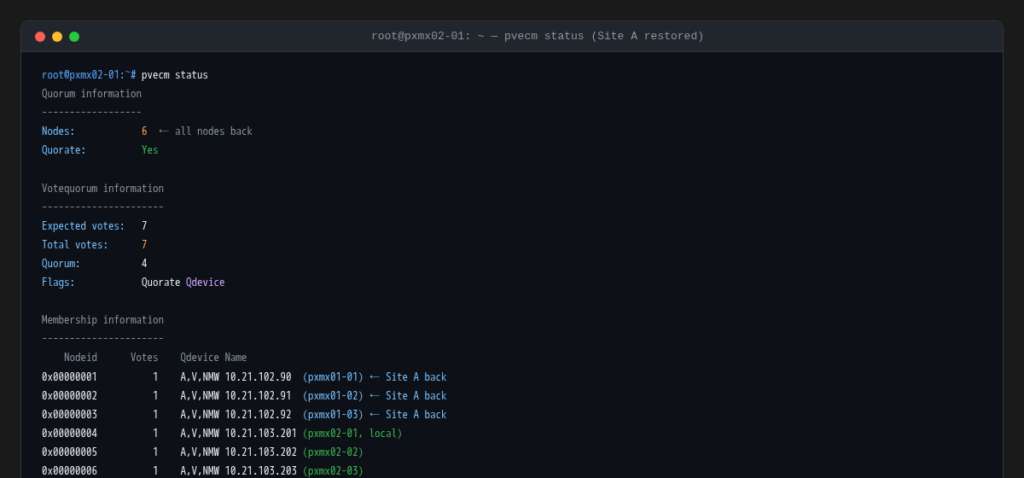
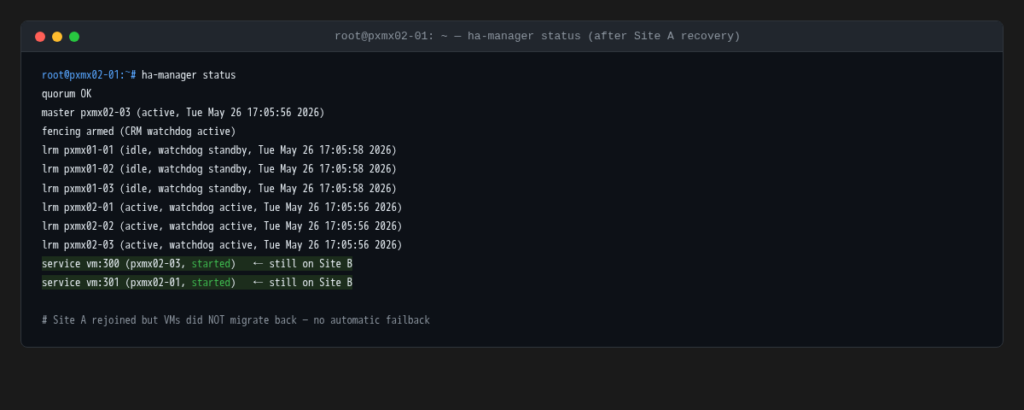
The VMs do not move back. With no failback configuration set, Proxmox HA leaves the VMs where they are (still running on pxmx02-03 and pxmx02-01). Site A rejoins as a healthy cluster member but the workloads stay on Site B until manually migrated. This is the right default behavior for a real incident: you want control over when and how you repatriate workloads after a site returns.
Why Not Fail the Arrays?
Fair question. If this is an ActiveCluster test, why not actually fail an array and watch the storage layer respond?
The short answer: that test is already done and documented. Everpure’s own ActiveCluster documentation covers array failure scenarios thoroughly (mediator-assisted failover, automatic promotion, split-brain resolution, and recovery procedures) and there’s no shortage of walkthroughs for it. What’s less documented is whether Proxmox (specifically its QDevice quorum model) holds together when an entire site goes dark and storage happens to already be available on the surviving side. That’s the gap this test was designed to fill.
How ALUA keeps I/O local in steady state
Every host is connected to both arrays and sees two path groups in multipath. Without ALUA guidance, a multipath driver would distribute I/O across all available paths and you’d end up with cross-site writes on every I/O (a Site B host writing through X90R3 Site A, the acknowledgement waiting on the synchronous commit back to X90R3 Site B) effectively adding the full inter-site round trip to every single write latency.
The “Preferred Array” field on each Purity host object solves this. Site A hosts have Preferred Array = X90R3 Site A, Site B hosts have Preferred Array = X90R3 Site B. The array advertises Active/Optimized (A/O, prio=50) ALUA states on paths from the preferred array and Active/Non-Optimized (A/N-O, prio=10) on paths from the remote one. Multipath routes all I/O through A/O paths in steady state, every host always writes to its local array with no cross-site latency penalty.
The real multipath -ll output from pxmx01-01 confirms it: prio=50 group carrying four paths through X90R3 Site A (LUN 253, local), prio=10 group with four standby paths through X90R3 Site B (LUN 252, remote), hwhandler='1 alua' showing the negotiation is active.
Why storage just worked when Site A failed
When Site A’s compute nodes went dark, Site B hosts already had fully operational A/O paths through X90R3 Site B, those paths had been there the whole time carrying all Site B I/O. There was no storage failover event, no path promotion, nothing for the storage layer to do. If X90R3 Site A had failed instead of the compute nodes, multipath on Site A hosts would have promoted the prio=10 paths to X90R3 Site B automatically, also with no intervention required. ActiveCluster handles both scenarios the same way: transparently.
The Proxmox LVM activated the logical volumes (already accessible via the existing A/O paths on Site B) and started the VMs. That’s the design. ActiveCluster handles the storage layer, and once you’ve verified that it works the next question is whether your compute HA layer can do its job on top of it. That’s what this test answers.
References
- Pure Storage: FlashArray ActiveCluster User Guide (array failover, mediator configuration, split-brain resolution)
- Pure Storage: iSCSI Implementation Guide for FlashArray (Preferred Array, ALUA path states, host connectivity best practices)
- Proxmox VE: Corosync External Vote Support (QDevice)