Intro
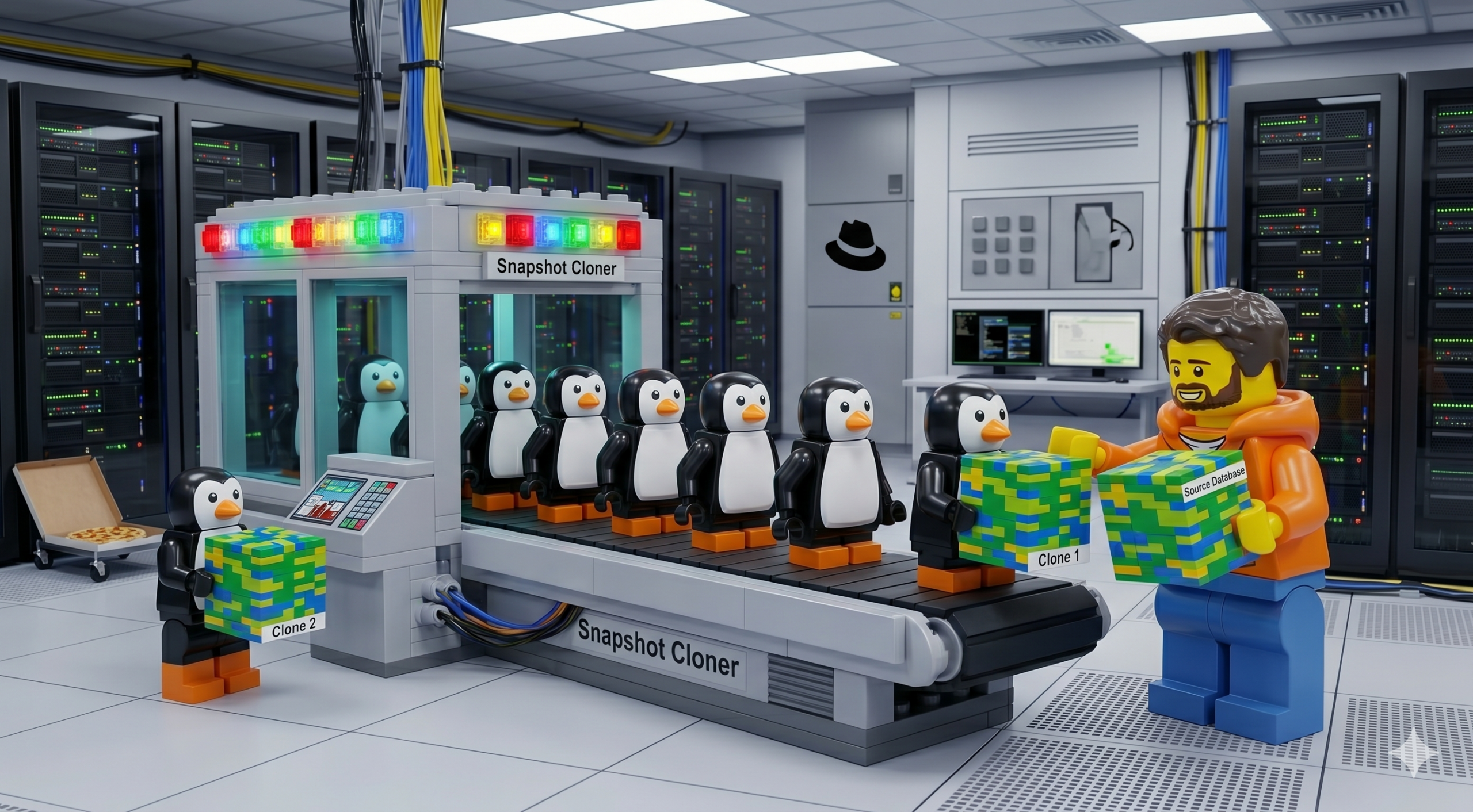
Array-based snapshots are one of the most powerful features in a database administrator’s toolkit. Once a DBA gets a taste of the speed and simplicity of cloning a database without actually moving any of its bytes, they scream “Great Scott!”, grow white hair, and pace around with a frantic Doc-Brown energy their manager finds mildly alarming. The landscape has shifted on us though, from a largely monocultured, VM-centric world to one of pods, containers, and microservices. I wanted to see whether the same magic still holds on the new side of the fence. So I wired up Portworx CSI against direct-access Pure FlashArray volumes and took SQL Server for a ride on OpenShift to find out.
Let’s get into it.
The Problem in One Sentence
Dev teams need their own isolated copy of the production database every morning, and the method we were using to make those copies is being deprecated.
The naive answer is to BACKUP DATABASE and RESTORE DATABASE for each team. That works, but it falls apart at two places: how long it takes (linear with the size of the database) and how much it costs in storage (fourteen copies of a multi-terabyte database is a lot of storage).
What we actually want is:
- Instant provisioning so an ephemeral environment is ready before a dev can finish their coffee
- Space-efficient cloning so fourteen copies don’t cost us fourteen times the storage
- Point-in-time consistency so a clone is a faithful representation of the database at a specific moment
- Clean lifecycle so tearing down an environment actually returns the resources
That list is exactly the shape of a storage-level snapshot-and-clone workflow. And since this customer is running OpenShift on top of Pure FlashArray with Portworx CSI in front of it, every one of those wants is already baked into the platform, we just have to wire it together.
The Stack
Quick map of what’s doing what:
- OpenShift is the compute platform. SQL Server lives in pods, just like anything else.
- Portworx CSI (
pxd.portworx.com) is the storage driver that provisions PVCs, handlesVolumeSnapshotobjects, and creates clones. - Pure FlashArray is the actual block storage underneath. Snapshots and clones on FlashArray are metadata operations, which is the single most important sentence in this entire post. I’ll come back to it.
mssql-tools18inside the container is how we talk to the database from a terminal, so we can keep the whole demo CLI-driven.
Why Snapshots Work Here (The One Paragraph of Theory)
A FlashArray snapshot is not a copy of your data, it’s a pointer that says “at this moment in time, this volume looked like this.” A FlashArray clone is a new volume that starts life pointing at the same blocks as its snapshot, and only diverges when something is written to it. The array is not moving any data! it’s writing a small amount of bookkeeping that says “this new volume starts off looking exactly like that old one.” That’s why a snapshot and a clone take the same amount of time whether the source volume is 10 GB or 5 TB. That is the whole trick, and everything we’re about to do is a consequence of it.
Setting the Scene: The Golden Database
We have a namespace called db-golden running a single SQL Server 2022 pod, backed by a 20 GB PVC on the FlashArray. Inside that instance is a database called CustomerDB with a single table called Customers. The table has ten rows. Let’s confirm that:
oc exec -n db-golden deploy/mssql-golden -- \
  /opt/mssql-tools18/bin/sqlcmd -S localhost -U sa -P 'P@ssw0rd123!' -C \
  -d CustomerDB -Q "SELECT COUNT(*) AS TotalCustomers FROM Customers;"
TotalCustomers
--------------
            10

(1 rows affected)
Ten customers. This is our T0 state. John Smith through Mary Martinez, IDs 1 through 10. This is the database we’re about to freeze in amber.
Capturing T0: The First Snapshot
Before we snapshot, I want to flush dirty pages from SQL Server’s buffer pool down to the volume. If I skip this step, my snapshot is still crash-consistent (SQL Server is designed to recover from that), but a simple CHECKPOINT makes it cleaner and means when we bring a clone up, it doesn’t spend its first thirty seconds replaying transactions on startup.
oc exec -n db-golden deploy/mssql-golden -- \
  /opt/mssql-tools18/bin/sqlcmd -S localhost -U sa -P 'P@ssw0rd123!' -C \
  -d CustomerDB -Q "CHECKPOINT;"
Now the snapshot itself. This is the entire manifest:
apiVersion: snapshot.storage.k8s.io/v1
kind: VolumeSnapshot
metadata:
  name: mssql-golden-snap-001
  namespace: db-golden
spec:
  volumeSnapshotClassName: portworx-snapshot-class
  source:
    persistentVolumeClaimName: mssql-golden-data
Fourteen lines of YAML. oc apply -f and wait:
NAME                    READYTOUSE   SOURCEPVC           RESTORESIZE   AGE
mssql-golden-snap-001   true         mssql-golden-data   20Gi          3s
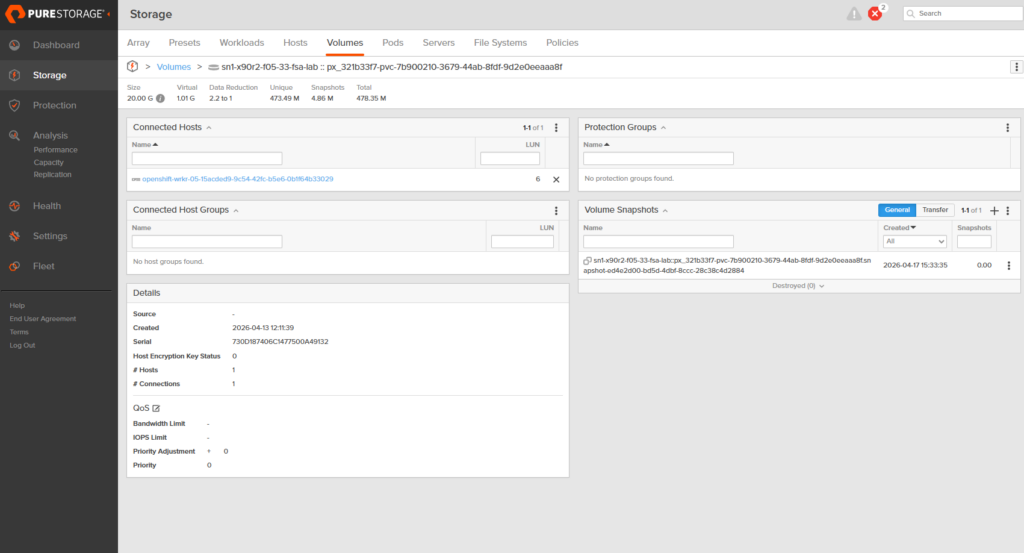
Three seconds. And if I look at the FlashArray directly, the volume now has its first snapshot attached, sitting at zero bytes of unique data, because nothing has been written since the snapshot was taken, there is nothing for it to diverge from.
Fast Forward: Writing More Data
Now the interesting thing happens. Someone, let’s call them Patricia Hernandez, becomes customer number 11. Then Christopher Lopez signs up. Then Linda, Matthew, Barbara. Five new rows get written into the Golden database, and we flush again.
oc exec -n db-golden deploy/mssql-golden -- \
  /opt/mssql-tools18/bin/sqlcmd -S localhost -U sa -P 'P@ssw0rd123!' -C \
  -d CustomerDB -Q "
    INSERT INTO Customers (FirstName, LastName, Email, Phone) VALUES
      ('Patricia','Hernandez','phernandez@email.com','555-0111'),
      ('Christopher','Lopez','clopez@email.com','555-0112'),
      ('Linda','Gonzalez','lgonzalez@email.com','555-0113'),
      ('Matthew','Wilson','mwilson@email.com','555-0114'),
      ('Barbara','Anderson','banderson@email.com','555-0115');
    CHECKPOINT;
    SELECT COUNT(*) AS T1_Customers FROM Customers;"
T1_Customers
------------
          15
Fifteen customers. This is our T1 state. A different moment in time than T0, on the same database, with the same primary key space, but five additional rows.
Capturing T1: The Second Snapshot
Same pattern, different name. mssql-golden-snap-002 pointing at the same PVC. A few seconds later:
NAME                    READYTOUSE   SOURCEPVC           RESTORESIZE   AGE
mssql-golden-snap-001   true         mssql-golden-data   20Gi          103s
mssql-golden-snap-002   true         mssql-golden-data   20Gi          3s
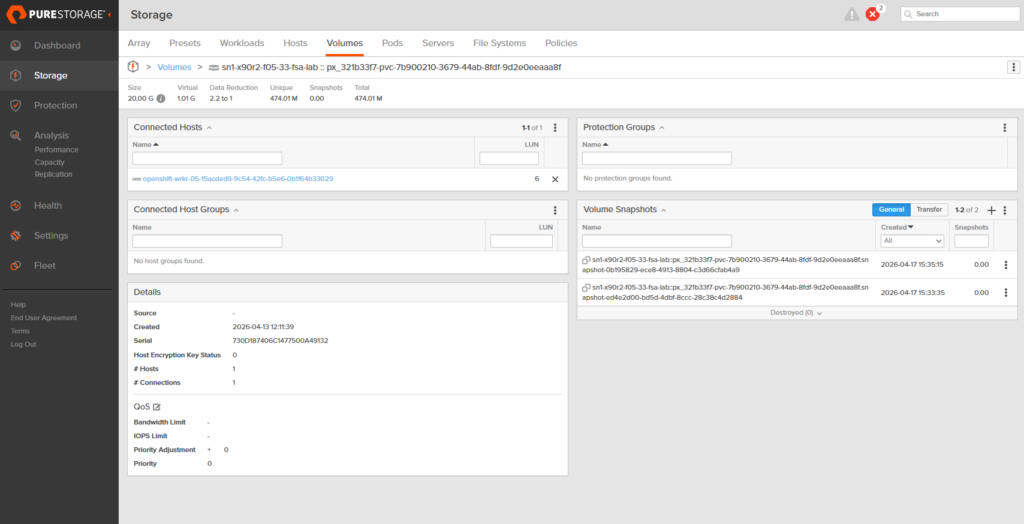
Two snapshots now live against the same PVC, separated by about 100 seconds of wall-clock time and 5 rows of application data. Both READYTOUSE=true. Both with zero unique data on the array because nothing has been written to the source volume since either one was taken.
This is the “time travel” part of time travel. I now have two coordinates I can teleport a new database to, the universe where there are 10 customers, and the universe where there are 15. Neither one is my current state, because the current state is still being written to. Both are frozen, immutable, and cheap.
The Slightly Weird Part: Cross-Namespace Clones
Here’s the gotcha that tripped me up. VolumeSnapshot objects are namespace-scoped, a PVC in ephemeral-test-001 cannot reference a snapshot that lives in db-golden, because the API won’t see it from the wrong namespace. The underlying VolumeSnapshotContent, however, is cluster-scoped. So we tell our ephemeral namespace, “there’s an existing storage snapshot out there, here’s its handle, please import it as a usable VolumeSnapshot in this namespace.” That’s the pre-provisioned VolumeSnapshot pattern:
# Cluster-scoped: imports an existing Portworx snapshot by handle
apiVersion: snapshot.storage.k8s.io/v1
kind: VolumeSnapshotContent
metadata:
  name: mssql-golden-snap-001-for-test-001
spec:
  deletionPolicy: Retain      # don't delete the source snapshot if this is removed
  driver: pxd.portworx.com
  volumeSnapshotClassName: portworx-snapshot-class
  source:
    snapshotHandle: "933790759990776287"   # Portworx handle for snap-001
  volumeSnapshotRef:
    name: mssql-golden-snap-001
    namespace: ephemeral-test-001
---
# Namespace-scoped: the usable snapshot object the PVC will reference
apiVersion: snapshot.storage.k8s.io/v1
kind: VolumeSnapshot
metadata:
  name: mssql-golden-snap-001
  namespace: ephemeral-test-001
spec:
  source:
    volumeSnapshotContentName: mssql-golden-snap-001-for-test-001
You get the snapshot handle from the original VolumeSnapshotContent:
oc get volumesnapshotcontent <name> -o jsonpath='{.status.snapshotHandle}'
Two things to notice. First, deletionPolicy: Retain on the import is the right default. Both VolumeSnapshotContent objects, the one in db-golden and the imported one in the ephemeral namespace, point at the same array snapshot handle. With Delete, tearing down the ephemeral namespace would issue a DeleteSnapshot RPC back to the array and eradicate that shared handle out from under the golden namespace. The existing clones would keep running (a Pure clone is an independent writable volume the moment it’s provisioned), but the T0 point-in-time itself would be gone. You’d lose the ability to spin up any new ephemerals from it, and you wouldn’t notice until somebody tried. Second, this isn’t a second copy of the snapshot; it’s a second Kubernetes wrapper around the same array snapshot. You can have as many wrappers in as many namespaces as you like, all pointing at the same frozen point in time.
Provisioning the Clones
The PVC just references the in-namespace snapshot as its dataSource:
apiVersion: v1
kind: PersistentVolumeClaim
metadata:
  name: mssql-ephemeral-data
  namespace: ephemeral-test-001
spec:
  accessModes: [ReadWriteOnce]
  storageClassName: sn1-x90r2-f05-33-fsa-lab
  resources:
    requests:
      storage: 20Gi
  dataSource:
    kind: VolumeSnapshot
    name: mssql-golden-snap-001
    apiGroup: snapshot.storage.k8s.io
The Deployment and Service are the same SQL Server 2022 pattern as the Golden instance, they’re in the lab repo. We apply the same stack a second time into ephemeral-test-002, pointed at snap-002 (T1) instead of snap-001. Watching both namespaces come up:
=== PVCs ===
NAME                   STATUS   VOLUME                                     CAPACITY   AGE
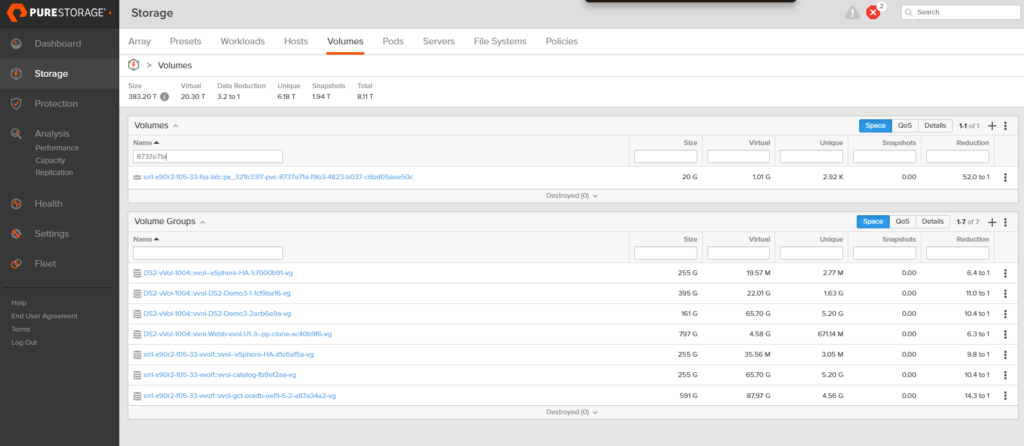
mssql-ephemeral-data   Bound    pvc-8737e71a-f9b3-4823-b037-c6bd05aee50c   20Gi       17s   # T0 clone
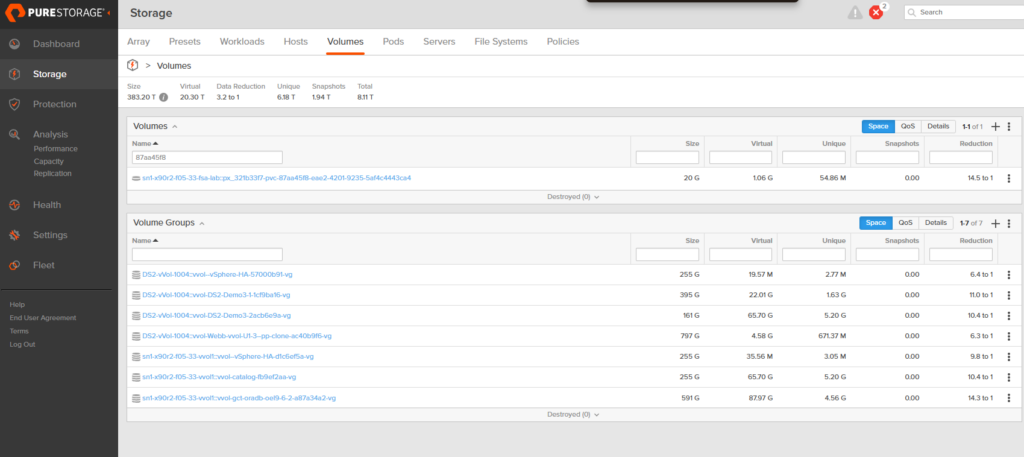
mssql-ephemeral-data   Bound    pvc-87aa45f8-eae2-4201-9235-5af4c4443ca4   20Gi       16s   # T1 clone

=== Pods ===
mssql-ephemeral-65c4cb4c59-bgjff   1/1   Running   44s   # T0
mssql-ephemeral-65c4cb4c59-4mjbn   1/1   Running   43s   # T1
PVCs bound in seventeen seconds. Pods ready in forty-four. Two full SQL Server instances, each running against its own writable, isolated clone of the golden volume, cloned from different points in the golden volume’s history.
The Payoff: Proving Each Clone Sees Its Own Reality
This is the moment the whole post has been building to. We have two ephemeral SQL Servers. One was cloned from T0, one from T1. Same query, each against its own namespace:
# Against ephemeral-test-001 (cloned from T0)
oc exec -n ephemeral-test-001 deploy/mssql-ephemeral -- \
  /opt/mssql-tools18/bin/sqlcmd -S localhost -U sa -P 'P@ssw0rd123!' -C \
  -d CustomerDB -Q "SELECT COUNT(*) AS TotalCustomers FROM Customers;"
# →  10

# Against ephemeral-test-002 (cloned from T1)
oc exec -n ephemeral-test-002 deploy/mssql-ephemeral -- \
  /opt/mssql-tools18/bin/sqlcmd -S localhost -U sa -P 'P@ssw0rd123!' -C \
  -d CustomerDB -Q "SELECT COUNT(*) AS TotalCustomers FROM Customers;"
# →  15
Ten and fifteen. Same database, same table, same schema, two different realities. The T0 clone has no concept of Patricia Hernandez. The T1 clone has never met a database without her. Neither of them knows anything about the other, and neither of them is affecting the Golden database that both were cloned from. They each live in their own timeline, wiping tables, running destructive migrations, stress-testing deletes, and when the developer is done, the namespace gets deleted and everything goes with it. That is the capability we were trying to build.
What This Looks Like on the Array
Here’s where the “metadata operations” sentence from earlier comes home to roost. On the FlashArray, we now have three volumes: the golden source and two clones. They all advertise themselves as 20 GB. But the column that matters is Unique, the amount of physical data on the array that this volume is responsible for.
The golden source volume: 16.33 MB unique. The actual CustomerDB data, MSSQL’s system databases, and on-disk bookkeeping. The real data.
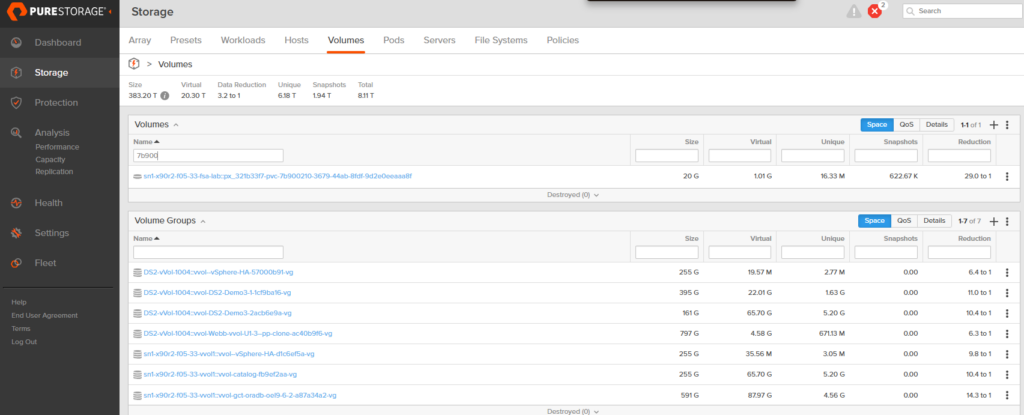
The T0 clone (ephemeral-test-001): 2.92 kilobytes. Not megabytes. Kilobytes. Every unwritten block is still served from the shared snapshot blocks; only the handful of startup writes SQL Server made on boot have actually landed as unique data.
The T1 clone (ephemeral-test-002): 54.86 MB unique. A bit more runtime, a bit more activity, still a rounding error compared to the 20 GB it presents to the OS.
Three independent 20 GB databases. Combined unique storage cost: under 75 MB. Fourteen of these would still fit in a single gigabyte.
Why This Matters at Scale
Everything above happened on a 20 GB lab database. That’s a toy. The customer who owns this problem is looking at multi-terabyte production databases. Here’s the sentence that matters:
FlashArray snapshots and clones are metadata operations. Whether the PVC is 10 GB or 5 TB, the snapshot still completes in milliseconds and the clone still attaches in seconds, because the array is not copying any data, it’s just writing a small amount of bookkeeping that says “this new volume starts off looking exactly like that old one.”
Provisioning time doesn’t scale with database size. Storage cost doesn’t scale with number of clones. A dev team running fourteen nightly environments off a 2 TB production database under the old copy-based pattern would be looking at 28 TB of storage and a multi-hour provisioning window every night. The same fourteen environments under this pattern cost essentially zero extra storage the moment they spin up, and each one is ready in under a minute. That’s not a small optimization, that’s a different category of thing.
Outro
If you’re wrestling with ways to efficiently copy and snapshot your databases, all you need underneath it is a CSI driver that understands snapshots and a storage array that understands metadata operations are king. If you’re on OpenShift and Pure FlashArray, you already have both.
Happy cloning!